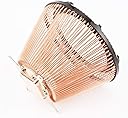

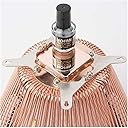


🧊 Silence is the new power: cool your CPU without a whisper.
The Nofan CR-80EH is a fanless, full-copper passive CPU cooler designed to handle up to 80W TDP. Compatible with a wide range of Intel and AMD sockets, it uses multiple heatpipes to efficiently dissipate heat silently. Its compact size and lightweight design make it ideal for minimalist, noise-sensitive professional setups, though it’s not suited for overclocking or extreme thermal loads.
| ASIN | B00HW2O2L2 |
| Brand | Nofan |
| Compatible Devices | Desktop |
| Cooling Method | Heatpipe, Passive |
| Customer Reviews | 4.3 4.3 out of 5 stars (32) |
| Date First Available | January 16, 2014 |
| Global Trade Identification Number | 08809318200117 |
| Is Discontinued By Manufacturer | No |
| Item Weight | 10.6 ounces |
| Item model number | 2021-01FU-4-58879 |
| Manufacturer | [Nofan] |
| Material | Copper |
| Maximum Rotational Speed | 2500 RPM |
| Noise Level | 30 Decibels |
| Number of Items | 1 |
| Product Dimensions | 6.1"L x 4.45"W x 6.1"H |
| UPC | 191997005960 |
| Voltage | 12 Volts |
| Wattage | 80 watts |
W**S
Works well, with some caveats -- NOT FOR OVERCLOCKING -- Silence is golden
My first two computer builds were made using conventional PSUs and coolers which were selected to be "quiet". They were so nice they made me wonder about "silent". I built two identical systems using Intel i7-4770S CPUs and the NoFan CR-95 cooler, which has been discontinued. I put those in CoolerMaster perforated cases with all fans and filters removed. Running fanless power supplies and the onboard Intel graphics, these things were a revelation. I am completely committed to fanless, silent computing. The CR-95 keeps those 4770S's quite cool under normal loads and even transcoding video at @100% load they don't come close to temp-throttling. The CoolerMaster cases I used are huge and I wanted to build something a little less space hungry. I used the Thermaltake Core P1 and a mini-ATX board, Seasonic fanless PSU and this NoFan CR-80 cooler and the intel i7-8700 CPU. This cooler is much smaller than the CR-95 and has less cooling capacity. Installation was much less clumsy than the CR-95. The trickiest part was assembling the mounting bracket. Getting the cooler mounted onto the CPU was very straightforward with the bolts going through the board front to back without any fussiness about positioning. (TIP: Apply your thermal compound to the CPU and invert the cooler on a table and place the mobo upside down over the cooler bolts and then tighten the nuts. Easy, and no sliding the cooler all over the CPU, which isn't so good for the thermal seal.) The cooler clears the memory and the PCH heatsink on my board but only by a paper-thin margin. On a more spacious micro-ATX or larger board, this should not be a problem and with memory farther away and this cooler's much smaller base diameter, you'll have less probability of interference than you would have with the CR-95. The Thermaltake case is all open so offers the highest possible amount of free air flow. The CPU idles in the low to mid 30°s C. Under normal task loads it mostly runs in the 40°-50°C range. Under full load, transcoding video, the CPU will hit 100°C although the load figures don't show that it actually trips throttling. This is to be expected when using Intel's Turbo Boost. When triggered, Turbo Boost forces the CPU way over its normal power rating and above the capacity of this cooler. It comes down from those temps very quickly once the task completes or you terminate it. This leads us to the caveats. THIS IS NOT FOR ANY KIND OF OVERCLOCKING. Don't buy this and complain that your overclocked rig runs too hot and has problems. I have decided to disable Turbo Boost. This does not affect most "typical" usage since the CPU is rarely working anywhere near its capacity. Performance for things like transcoding video is reduced but not by so much that it bothers me. In the open case, running near 95% CPU load while transcoding, it hovers around a max of @ 80°C with sustained use and Turbo Boost disabled. The bottom line is that this cooler works well when your goal is absolute silence and you match it with a thoughtfully selected CPU, case, and PSU, and your computing demands are reasonably normal. I would recommend that for really heavy loads, Turbo Boost be disabled to keep temps in a safe range. You will probably not notice much difference in performance and most of the time there won't be any difference. You *might* not need to do this if you run a 35 watt CPU, but I can't promise; I can only say what I see using the 65 watt CPU I have. If what I write makes you think you might run case fans with it, or you're looking at a graphics card or PSU with a fan, I would say don't bother with this cooler. You'd do at least as well with a big cooler running with a slow fan. This NoFan cooler is for when you want SILENCE and are willing to tailor everything towards achieving that goal. If that's what you want, this cooler is what you need.
H**S
Looks awesome, mounting could be better
I love the look of it. It has no problems cooling a 65w CPU in real world daily use and light benchmarking. Please note that it is normal for a CPU to run hotter when using passive cooling especially at idle. Noctua has a great article about this on their website in reference to their passive cooler if you want to read it. Basically you "want" the CPU to run hot because the hotter it gets, the easier the passive cooler is able to shed heat. The passive cooler becomes more and more efficient as the CPU temperature rises. So typically what you see is that a CPU idles very hot with a passive cooler, but then as the load increases the temps do not increase much because the passive cooler has hit a temp where it begins to shed heat very well. It is fine to run a CPU on the hot side, it is not going to hurt it. I do have case fans in my case but I spin them at only 300rpm so there is only a tiny amount of airflow through my case. Overall I am impressed by its performance for the size. It clears my RAM. My only real complaint is that the mounting system is not very good. I would prefer a mounting system that used springs and attached from the topside of the motherboard.
R**Y
Very pleased, but maybe not the average use for this device
My system build is built to be quiet, but not fanless. I used the CR-80EH with an Intel 4790S. (Please note: this is the S version of the 4790, I would not try this build with a 4790K) I have a 200MM fan at the top of the case running at 700 rpm. The system has been up and running for almost a year with an Intel factory CPU fan and the same 200MM fan running at the same slow speed. With the Intel CPU fan, the CPU had an average temperature of 34C. With the CR-80EH in place (still using the 200MM case fan, still running at 700 rpm) the CPU temperature averages 28C. I've dropped 3 watts from the system power consumption, removed a mechanical point of failure to a passive cooler, that I believe is less likely to fail and dropped the CPU temperature. A win in all directions, from my point of view. The installation was straight forward, but does require that the mother board be removed. The installation was using an Asus version E9017 Z97K motherboard with an 1150 socket. I used the supplied heat sink grease which had to be painted on with a small brush. It was a little time consuming, but the outcome was quite satisfactory. I first cleaned the CPU and CR-80EH with an alcohol pad, and let it dry. Then painted the CPU, covering the entirety of the surface area, which required painting vertically and horizontally. I touched up missing spots and then repeated the process on the new CR-80EH. It is obviously working well as the temperature differential between the CPU temperature and environmental temperature is only approximately 10 degrees F.
B**S
Good cooler, but can't handle 80 watts
I'm using this cooler with a Ryzen 2700, undervolted and underclocked to 2.8 GHz, in a fanless PC. The 2700 is rated at 65 watts, and will quickly reach its maximum temperature of 95°C unless underclocked. The maximum power this cooler can handle is probably closer to 40 watts. It might be able to handle 65 or 80 watts with a large case fan, although that defeats the purpose of a fanless cooler.
H**N
Choose this for the appropriate low power CPU and you'll be ecstatic!
Perfect for a quiet PC application. I got tired of the noisy CPU fan in my old home theater PC and so I built a new one with a 35W i3 processor, one of these coolers, a cheap but quiet power supply, and a nice solid state hard drive. The fan noise was an annoying higher pitched whir with my old machine, especially during action sequences of movies (to deal with the harder work). Now I have a nearly silent and totally unobtrusive light noise from the slow turning power supply fan in the new case. If you want a quiet machine, how could you go wrong? For what it's worth, I have an ASRock H110M-HDS motherboard and an Intel i3-6100T CPU. That's a socket 1151 motherboard and this fit fine and works perfectly.
Trustpilot
2 months ago
2 weeks ago