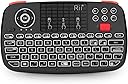
🎯 Control Everything, Anywhere — The Ultimate Mini Keyboard-Mouse Combo
The Rii I4 is a cutting-edge dual-mode wireless mini keyboard featuring Bluetooth 4.0 and 2.4G connectivity, an integrated scroll wheel with dedicated mouse buttons, and a rechargeable lithium-ion battery offering up to 41 hours of use. Designed for professionals and media enthusiasts alike, its compact size and broad compatibility make it the perfect tool to transform any device into a smart control hub.


| ASIN | B07RNCJ39B |
| Batteries | 1 Lithium Ion batteries required. (included) |
| Best Sellers Rank | 3,267 in Computers & Accessories ( See Top 100 in Computers & Accessories ) 34 in Keyboards (Computers & Accessories) |
| Colour | Black |
| Connectivity technologies | Bluetooth |
| Customer Reviews | 4.4 4.4 out of 5 stars (1,456) |
| Date First Available | 10 May 2019 |
| Item Weight | 180 g |
| Item model number | Rii i4 |
| OS | Android, Linux, Mac OS, Raspberry Pi OS, Windows 2000 |
| Other display features | Personal Computer |
| Product Dimensions | 15.49 x 8.89 x 1.65 cm; 180 g |
| Special features | mini keyboard for pc |
| What’s in the box | USB Cable |
A**E
Great but could be improved
Sensitivity of the touch pad could be better as it's not super accurate like a modern phone touch screen or laptop touch pad, and I'd like a mouse button under the touch pad so I can use one handed. Some of the keys are in different places to what I'm familiar with, like the apostrophe symbol. Apart from all that, it's a great device that turns my TV into a media PC when paired with my laptop. It goes to sleep after a few minutes, but that's probably a good thing to save battery life. You can easily switch it off and on to wake it up. The red scroll wheel is really useful and works well. Volume control is also useful. The shoulder buttons act as left and right mouse buttons. The d-pad is like the arrow keys on a keyboard. I haven't tried Bluetooth, I just used the USB dongle and it worked straight away on a Linux computer with no need to download any drivers.
A**Y
The size is an excellent compromise between usability and convenience of such a small board.
Works really well. Feels good and quality is good. I use it with a Raspberry Pi - perfect. Such a small keyboard is always going to be more tricky to type with howver this does work. Built in mouse pad works well and the scroll wheel and cursor keys are well positioned. Wish I'd bought this a long while ago. You wouldn't want a smaller keyboard for sure but a bigger one would make it more difficult to hold in the hand. Great size.
K**N
Works well
If you want a compact keyboard / mouse solution this seems to be a solid option, bumper mouse buttons are nice, backlight makes it easy to use in the dark, internal battery has decent life with usb-c charging, easy BT / 2.4hz mode switching allowing connecting to two devices is nice. The soft keys have a destinct click so it doesn't feel mushy, not something you'd want to type a lot on, but good functionality for it's size and price.
M**H
Everything I Wanted and More
I bought this initially based on a review which said it was pretty decent for use with the Steam Deck. They were right! This thing works flawlessly with my Deck, i don't bother with the transmitter either as the bluetooth works so well. I used this to help me get my emulators and retro games all set up properly, and continue to use it all the time. The battery life seems pretty decent. No issues here. It has a built-in power save/sleep function which clearly helps it a lot. Some people describe this as a pain, but, the alternative would be the device staying perpetually "on" and i bet the same people would then be complaining here about it needing too many charges. To wake from sleep press any button and it will automatically reconnect to the device (quickly too). The layout of the device is really efficient: - the scroll wheel feels great and works like a charm. - the left and right shoulder buttons act as left and right mouse clicks (my preferred way of using the deck is holding it like a controller, using these shoulder buttons with index fingers, whilst thumbs use the touch pad). - the touch screen/pad is responsive, and you can scroll a lot more quickly and accurately with this if you practise (and with a quick button combo you can increase sensivity). - You will quickly develop muscle memory with this; i can now type pretty well and control streams without even thinking. Other places this controller has shined for me: - taking it to social gatherings so i can quickly get Steam party games set up (like jackbox). - couch/bed streaming - I actually use this with my desktop PC all the time, so i can sit back and relax in bed whilst controlling series/films etc. The tiniest of negative points: You won't be able to tell from your connected device how much battery this thing has left, it seems to always say 99% when i check on my PC or Deck. However, i hear this is quite a normal issue with all sorts devices simply not supporting this feature.
N**G
Responsive controls and comfortable to hold
I have been using the device for a good few months now and so, I can say that it really suits the needs that I purchased it for. The majority use of this device is to allow navigation and typing on a computer that I have connected to the living room TV to negate the need for a full sized keyboard/trackpad whilst sat on the couch. The device is connected to the computer via the wifi dongle and the response time is absolutely fine for navigating Windows 11. I also have set up the Bluetooth connection to navigate MacOS on an iMac with no noticeable lag to make navigation awkward on either Operating System. The switching between the two connectivity methods is simple on the device itself and changes virtually instantaneously. The backlighting on the keyboard is very helpful when ambient lighting is low. However, the device sleep timing is quite short and requires a key depression to re-wake the device. This is not a major issue but sometimes annoying if the trackpad is your major use, as trackpad movement doesn't appear to wake it up but only a physical key press. The battery life is reasonable but a feature that would've been handy would be a battery low indicator (however, when the battery is almost drained, the connectivity light does begin to blink off with every key pressed). Key presses themselves are pretty solid and leave no doubt that the key has been pressed, which may be handy to those that look at the device as opposed to the screen when typing who then look up to see that half the inputted key presses didn't register. The device is nice and light but well manufactured. The size is more than adequate for all the functions that the device has and nothing seems too tight to cause mis-clicking of the wrong button. The scroll wheel works well, the trackpad is responsive and the multi-touch functions seem to work as designed. The only thing I would have wished for, that is missing, is to have a shift key on the right-hand side of the keyboard. As, being a left hander, having to use the shift key from the left is an un-natural motion for me as when using a full sized keyboard, I would use my left-hand's little pinky to press that key leaving the rest of my fingers free to type any key on the left-hand side of the keyboard. Overall though, I am more than happy with this device since purchase and it does get used on an almost daily basis. So, for the price, I think it is a great piece of kit with its dual frequency capability and back lighting, it is a step above similar looking device of a similar shape (one of which I had purchased previously that was single frequency, no backlight nor scroll wheel).
Trustpilot
2 days ago
2 months ago