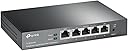
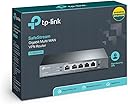
Desertcart purchases this item on your behalf and handles shipping, customs, and support to Iceland.
🔐 Power up your network with speed, security, and surge-proof peace of mind!
The TP-Link Safestream TL-R600VPN is a high-performance multi-WAN VPN router designed for small offices and demanding home networks. Featuring 5 Gigabit Ethernet ports (1 WAN, 1 LAN, 3 configurable WAN/LAN), it supports up to 20 IPsec VPN tunnels with advanced encryption standards. Its robust security suite includes SPI firewall, DoS defense, and IP/MAC filtering, while professional 4KV lightning protection ensures hardware durability. Easy to set up and manage, this router delivers reliable, high-speed wired connectivity and enterprise-grade VPN security for seamless remote access and network protection.

| ASIN | B007B60SCG |
| Best Sellers Rank | #109,919 in Computers & Accessories ( See Top 100 in Computers & Accessories ) #2,276 in Computer Routers |
| Brand | TP-Link |
| Built-In Media | TL-R600VPN, Power Adapter, RJ-45 Ethernet Cable, Quick Installation Guide |
| Color | Black |
| Compatible Devices | Personal Computer |
| Customer Reviews | 4.2 out of 5 stars 1,787 Reviews |
| Data Transfer Rate | 1000 megabits_per_second |
| Global Trade Identification Number | 00112039993281, 00803983008281, 06935364041250 |
| Interface | 1 Fixed Gigabit WAN Port1 Fixed Gigabit LAN Port3 Changeable Gigabit WAN/LAN Ports |
| Item Dimensions L x W x H | 6.2"L x 4"W x 1"H |
| Item Part Number | TL-R600VPN |
| Manufacturer | TP-Link |
| Mfr Part Number | TL-R600VPN |
| Model Number | TL-R600VPN |
| Number of Items | 1 |
| Number of Ports | 5 |
| Platform | Windows 7, Windows Vista Business, Windows Vista Home Basic, Windows Vista Home Premium, Windows Vista Ultimate, Windows XP Home Edition, Windows XP Professional |
| Product Dimensions | 6.2"L x 4"W x 1"H |
| UPC | 778890698408 809186281292 112039993281 803983008281 845973041175 |
| Unit Count | 1 Count |
| Voltage | 9 Kilovolts |
| Warranty Description | 5 year - parts & labor |
A**N
Best router for multi-wan SOHO and home use!
Ok the journey to replace my old tp-link 470+ router took almost a month of research and testing. Here is what I found out and I really hope this helps someone save a bit of time. I was a network administrator over 20 years ago. I do not consider myself an expert by a long shot. I have two 4 Mbps DSL lines entering the house (I am not close to any city). I have an email server, file server and our house is extremely automated. There are only 2 of us in the home but myself and my wife are avid gamers. We stream most of our tv/movie content. Our workout room is all connected with video instructors. I have both mac laptops and tablets, windows gaming laptops, VOIP, Xbox and Linux boxes all running off this network. Daily I am downloading 20-100gig games in the background. I also have a mesh wifi covering the 3 floors of the house and the grounds outside of the home. This gives you and idea of what my challenges are. I want to get use of the full 8 Mbps bandwidth for downloads then scale back so we can watch a movie or play a game or listen to music throughout the home all while the game keeps downloading but at a slower speed. When we are not using the network I would like it to speed back up and use the full 8 Mbps again. I tested an Ubiquiti edgerouter 4, TP-Link TL-R600VPN V4, pfsense on an old water-cooled 3ghz gaming computer and on a protectli vault 4 port quad core. Here is what I experienced. First test was the tp-link. It was running in about 20 minutes from when I took it out of the box with the email server port forwarded. I was able to access my email server outside the house and inside even with pointing our phones to the no-ip dynamic DNS address (kind of like a loopback or NAT reflection). It simply worked. But monitoring is near non-existent so I would need a secondary network monitor and SMS connect which it supports but I figured I would test some other routers. It was so simple to setup including QOS that I kept coming back to use this router as the gold standard setup. Second, I spent a little over a week with the edgerouter 4. It gets great reviews, and the network monitoring was the best of the bunch for me with PfSense a close second and tp-link at near non-existent monitoring/graphing traffic. I always knew what was going on and what the edgerouter was doing with its excellent dashboard. After a few days and many hundreds of pages of reading on forums and chatting with folks as the edgerouter has a very helpful community I got it up and running with both wans and the email server. But gaming was not great. Buffer lag and bloat and constant disconnects were simply just unacceptable and after a week I threw in the towel. Interesting the first-person shooters were not the only issue but Guildwars 2 would just drop either myself or my wife mid adventure 3-4 times in an hour and at other times we could go a complete hour before one of use was dropped. This never happened with the tp-link 470T+ in 4 years, the PfSense or the TP-Link TL-R600VPN. It was only the edgerouter. I had to box up the edgerouter and stop all further work with it. The last router(s) I tested was pfSense with both an old 3ghz gaming box and a protectli 4 port fanless box. I will say the PfSense was the my favorite of all interface and the things that the software can do is incredible. It look less than an hour to download and get the box up and running on my old pc. I purchased a dual port intel nic from amazon and with the nic already on the motherboard I was able to connect 2 dls lines and the local ethernet line. PfSense was completely free! Just the cost of the hardware you will need to run it. After tweaking it for a week I got the load balancing working and the QOS dialed in, performing better than the TP-link TL-R600VPN. I was able to get the most bandwidth with pfSense but I never was able to get my mail server working quite right. I thought the issue was my old gaming computer and I purchased a protectli fanless box – the quality is top notch and installing PfSense took just a few minutes. I can’t say enough about the little box and its capabilities. I think it only used 20W total, so it was not a huge power consumer as the gaming rig/router was. But without getting PfSense working I had to abandon the box. As I recall I spent $350 on the box so it became the most expensive router of the 4 tested. Conclusion – I ended up going back to the TP-Link TL-R600VPN. Why? Well it was the lowest power used, it had 5 lan ports, QOS and load balancing. Its port forwarding and virtual servers work great but most of all everything work right out of the box. I mean everything. Dynamic DNS was a breeze to setup. I am serious when I say it was less than 20 min to get the whole router up and running. I realize I could have spent another couple of days or weeks getting the other routers to work but I finally decided why? This is a home network, I have learned all I wanted to at this point and I had a router that simply worked out of the box for a multi WAN install. Is it perfect – no. Can I monitor the network from its own interface – no! I don’t work for any of these folks and I am not in the tech industry. I am a purchasing manager so trust me there will be many who can do better at setting these up but this is my experience and like many others with a reasonable non-professional understanding of networking this review is intended for you.
D**O
Fast, and minimal initial setup required
I grew tired of constantly rebooting my wireless router when it got bogged down by all the devices connected to it, and the diverse data needs of those devices. My theory was that if I offloaded the router / gateway work to a dedicated device, and switched my wireless router to access-point mode, the separation of concerns would prove more reliable. So I searched for a stand-alone wired router that would be appropriate for demanding home use (streaming, work-from-home VPN, Ring devices, Alexa devices, Roku devices, laptops, phones, and tablets; 26 devices in all), but that wouldn't break the bank. After some research this TP Link model seemed to fit the use case I had in mind. Setup was pretty easy; plug the router into my cable modem, plug my desktop system into the router, reboot the cable modem, and everything just worked. That last step was critical though; the cable modem didn't want to assign an IP to the router until I rebooted it. This is not the router's fault -- it's just something cable modems often do. After I connected the desktop system via network cable, I was able to log into the web GUI for the router. It asks you to set a username and password, and that's pretty much all that was needed to get started. There are plenty of settings for more complicated needs. For example, I set up port forwarding for a couple of services on my desktop system, and set up an IP reservation for the desktop. Next I plugged my old router into the new router. This cascading routing worked just fine, though it wasn't my end goal. So I logged into my wireless router and set it to access point mode. The wireless router rebooted, and then I watched the TP Link's list of DHCP reservations, witnessing each of the wireless devices connected on my network reconnecting using the old router as an access point and the new router as the gateway and DHCP server. It works flawlessly in this configuration. Whats more, it seems to provide better throughput then when everything was going through the old router (both wired and wireless connections). My Internet service is touted to be 200 Megabit, but before the upgrade I was seeing speeds in the 160 Megabit range for wired devices. The old router just had too much going on, I guess. With the new router my wired speeds are in the 230 megabit range, and even my wireless speeds reach up that high if I'm sitting close enough to the access point. Things I like about this device: It's small, easy to use, and powerful enough to handle a household of streaming plus work-from-home VPN, plus various other odd devices (Alexa, Hue, Roku, laptops, android phone and tablets, etc). The device's GUI is not exactly simple, but basic operation *is* simple. And after becoming familiar with the web GUI everything that should be there is pretty easy to find, and then some. Configuration options are also a lot more powerful than typical home wifi-routers. I also like that it allows me to hide the squirrel's nest of network cables without also being forced to hide the wireless access point. When you have your router acting as a wired network switch plus a wireless router, you've got to set that thing where wifi propagation will be best. But if you separate those concerns, all the wiring can go to the router, hidden away somewhere, and a single network cable can then run to the wireless access point. Cable management and clutter are easier to minimize. I like the device status page, too. Why can't home wireless routers provide such easy to understand stats? This router's stats make sense and are actually useful. And I like the system log viewer in the GUI. Again, system logs seem way too hard to look at on home / consumer level wireless routers. This devices log page actually shows relevant information. Finally, I'm looking forward to the day when I upgrade my wireless network to WiFi6/AX without having to reconfigure the router settings. I can just set up a WiFi6 access point, and all the wired router's settings still apply. Much easier transition, and less expensive. Routers and WiFi have different product life cycles. It's great separating those concerns, the result is usually better performance and better flexibility. I've done some additional testing. Using the 'iperf' tool I verified that throughput within the LAN reached speeds in the 926-948 megabit range. That's exactly where things ought to be for a gigabit router. I also watched CPU usage on the router while doing iperf tests and barely noticed even a blip on the graph; CPU usage remained quite low. NAT throughput is at least as good as I need it to be, also. I don't know where it maxes out, but my ISP claims to provide me 200 megabit service, and I'm witnessing 235 megabit throughput to the Internet. So the device is at least keeping up with the bandwidth I purchase, and then some. I think the advertised NAT throughput is around 620 mbps. So this should easily support the great majority of home Internet speeds.
B**4
Great Site to Site VPN Router with easy setup!
I just received this router, and I have to say I am quite impressed. In the past, I've been using two Cisco/Linksys WRVS4400N Routers to connect two sites together via VPN secure tunnel. The old Cisco Routers always give me issues, and always require a power cycle to work. Most times, the status would show the tunnel connected, but I've been unable to ping a LAN IP address from site 1 to site 2. I was pretty confident that my Cisco at Site 1 was the culprit, but I decided two order two of these just to be safe. When these items arrived, I was impressed with the build quality. Nothing fancy, just a nice solid piece of equipment. They don't have wifi, but since I am covering a large area, I had already installed a separate Wireless Access Point, a Ubiquiti Networks UniFi UAP-PRO Enterprise WiFi System (which is awesome by the way). I set up the first router at site #1. Initial setup was incredibly easy to get me online. I have Comcast 50MPS and my speedtest clocked at 62MBPS. Wish I had higher speed to test the capability, but Comcast is due to double the speed in my area, so I'll update once that happens. Since site #2 is a 30 minute drive away, I knew I wouldn't be able to get the new TP-Link TL-R600VPN installed at site #2 just yet. That said, just for fun I decided to attempt a IPSEC (site to site) VPN connection between the new TP-Link and my older, less reliable Cisco WRVS4400N at site #2. To my delight, first try, the two connected without any issues. They are working great! Indeed, my suspicion that the Site #1 Cisco router was faulty was accurate, but what surprised me is that TP-Link and Cisco routers are communicating and interacting without any issues. I can ping local IP addresses across both networks at site #1 and Site #2. This may be common knowledge to many advanced network folks, but was it was a pleasant surprise to me. I still plan to update the router at site #2 to the new TP-Link so all my hardware is current, but at least I am back up and running. As a side note, I placed my order on 11/29/2014 for quantity of 2. Both Items were Hardware Version 2, and both came with the most recent firmware (August 2014). In addition, the serial numbers were within a couple digits of each other which leads me to believe they were manufactured at the same time, post August 2014. Not a big deal to some, but I like knowing I have the most recent hardware possible and saved me having to update to the most recent firmware. There are not a lot of other bells and whistles, but if you are looking for a simple solution to securely connect multiple sites at a reasonable price and you already have another wireless solution in place, this seems like a great choice.
A**N
Good home router
I purchased this hoping for the following: 1. Faster downloads with the gigabit port 2. Better security with the SPI firewall 3. VPN access for when I travel SPEED I was hoping for a big jump here with the gigabit WAN port, but unfortunately my cable modem doesn't support gigabit so it's connecting at 100Mbps just like it did to my old 100Mbps router. However, I did get an increase in speed. Using speedtest.net as the measurement tool, the old router (no SPI firewall) had a download speed of 11.75Mbps, and when I replaced it with this new one it increased to 13.86Mbps. That's about an 18% increase in download speed with the same connection speed to the cable modem. The irony here is that the old router was a Dynex (Best Buy generic), which I can now guarantee you was made by TP-Link because the configuration screens are nearly identical. So this new router, despite doing more firewall checks on packets and the same network speed, is still faster. Can't complain about that. This router also leaves the door open for a faster cable modem; if I get a modem that has a gigabit port this router is ready for it. SECURITY I was hoping for some granular security features in this router's SPI firewall to let me pick and choose what to check for and block, but it isn't there. It's simply Enable/Disable. That said, the fact that it has a SPI firewall at all is much better than the old Dynex/TP-Link, which only had flood control. This router has flood control as well, but that's not really much by itself. This router also has port forwarding (not tested by me) and a DMZ function for one server. I use the DMZ function for my NAS (which has its own firewall), so it took all of 5 seconds to configure it just like it was configured on the old Dynex/TP-Link. It works perfectly. VPN I haven't yet tested this, but will soon and update this review. TIME Server One of the oddest things about this router is that it supports NTP time servers, but doesn't come pre-configured with any NTP addresses. I pasted in 2 time server DNS addresses from pool.ntp.org and it immediately updated, but why doesn't the manufacturer do this by default? Weird. There are lots of free time services out there like pool.ntp.org so it's not like it would cost them anything to do this. If you don't notice this and fix it yourself then all of your logs will show timestamps starting on 1/1/1970, because that's what it defaults to when you first power it up (and after every time it loses power). CONCLUSION This is definitely a good router for homes and small businesses. It's well built, has good basic security and has VPN access. Network pros who are used to Cisco IOS devices will probably not like this at all because it's not as flexible, but it's also not as costly. I got mine for $62, and that's one heck of a deal for everything that this router has. You can't even get a LinkSys with similar features for that (Cisco owns LinkSys). EDIT (8/29/2013): I have not been able to test the VPN due to the fact that I use the Virtual Server function to access my NAS over the Internet. When you use that feature VPN isn't possible.
E**S
Rock-Solid VPN Router for Small Offices
Rock-Solid VPN Router for Small Offices This TP-Link SafeStream VPN Router is built for reliability and versatility, especially in a small office or work-from-home setup. Setup is straightforward for anyone familiar with networking gear—plug in the WAN, assign LANs, and the web-based interface makes it easy to get rolling. I liked that it supports multiple WAN ports (1 Gigabit WAN, 3 Gigabit WAN/LAN, plus 1 dedicated Gigabit LAN), which means you can balance loads or have ISP redundancy. That’s a big plus if uptime is critical. VPN support is broad—IPsec, L2TP, and PPTP are all available. Performance is solid; it handled several simultaneous VPN connections in my testing without hiccups, and speeds were consistent. Security features like SPI firewall, DoS defense, and lightning protection add peace of mind. The build is sturdy, and the router feels like it could run for years without issues. A few things to keep in mind: while the web UI is clean, it’s not quite as polished as consumer routers, so beginners may need to spend a little time learning the options. Also, it doesn’t have Wi-Fi—this is strictly a wired solution, so plan to add an access point if you need wireless coverage. Bottom line: This is a dependable, business-class router at a very fair price point. It’s ideal for small businesses or advanced home users who want multi-WAN reliability and robust VPN features without overpaying for enterprise hardware.
I**E
Not happy. You should buy something else.
Unfortunately, I cannot return this item because TPLink support dragged out the support issue. When we got it, the item looks great. I installed it into our network as we needed a firewall due to repeated "pokes" against our phone system. To be sure, the firewall did end the probes coming from Russia, China, Romania, etc but the firewall randomly freezes access when a user is viewing streaming content. The "freeze" only affects the user who is accessing the streaming content -- all other users are fine. The only solution is to reboot the unit. I contacted TPLink and after nearly 3 months, they are sending a replacement. They had me re-update the firmware (shipped with the latest) then downgrade it. Nothing solved the problem We have a mix of Windows 7 and 10 desktops in the office and use Chrome and Firefox browsers -- We access streaming content on Youtube and private sites for training. The system gets locked out of internet access, nothing works -- email, http, etc and once the cache empties, the video stops. Secondly, TPLink support is VERY DISORGANIZED. I tried to open a ticket online and after 3 weeks, finally got an email apologizing that that was the wrong unit for support and they forwarded it. A week later, I was contacted by phone. The tech was extremely nice and tried to be helpful, but we had already done almost everything he suggested. Nothing fixed the problem. After 2 weeks of troubleshooting, he said they would replace the router. A month later, no router. I email and complain and am told they were waiting for me to ship my router in first (WTH?) and then they would send the replacement. I asked what am I supposed to do for a firewall router in my office while I am waiting -- this is a business, we cannot go even an hour without access. Two days later, they contacted and said they would ship one first and then I return the old one. I have used TPLink stuff in the past with fine results. This product is half baked and the support for it is terrible. Also, logging is useless. The only thing the system log on the router does is report on internal processes. There is no intrusion log, no security log of attempted logins, and no reporting on probes. THis is what the daily log looks like: #################################################################### # TL-R600VPN System Log # Time = 2016-07-27 8:00:02 669506s # H-Ver = R600VPN v2 00000000 : S-Ver = 1.2.3 Build 140801 Rel.49374n # L = 192.168.1.1 : M = 255.255.255.0 # W1 = STATIC IP : W = xx.YY.zz.xx : M = 255.255.255.224 : G = xx.yy.zz.zzz #################################################################### Jul 19 14:01:41 OTHER INFO System started Jul 19 14:01:48 SECURITY INFO PPTP Passthrough enabled Jul 19 14:01:48 SECURITY INFO L2TP Passthrough enabled Jul 19 14:01:48 SECURITY INFO IPSEC Passthrough enabled Jul 19 14:01:48 SECURITY INFO FTP ALG enabled Jul 19 14:01:48 SECURITY INFO TFTP ALG enabled Jul 19 14:01:48 SECURITY INFO H323 ALG enabled Jul 19 14:01:49 SECURITY INFO RTSP ALG enabled Jul 20 08:00:08 OTHER INFO Mail successfully. Jul 21 08:00:03 OTHER INFO Mail successfully. Jul 22 08:00:03 OTHER INFO Mail successfully. Jul 23 08:00:03 OTHER INFO Mail successfully. Jul 24 08:00:03 OTHER INFO Mail successfully. Jul 25 08:00:03 OTHER INFO Mail successfully. Jul 26 08:00:02 OTHER INFO Mail successfully. All it reports on is whether internal processes start and when the log is emailed. Throughput is decent, we have a 60mbps pipe and download speeds are usually around 55-60mb, but the other issues mean this is fatal. We will likely get the Netgear FVS product instead. I edited this review down to One Star. After using the NetGear FVS336g firewall, I now see just how terrible the TPLink product is. BUY SOMETHING ELSE IF YOU WANT A GOOD WORKGROUP FIREWALL!
R**Z
Great for Gig Internet Connection at Home
Upgraded from a 10 year old SOHO commercial firewall which was faithful and reliable to end. Trying this product out and going from an expensive high end firewall to a relatively inexpensive no-name brand was a bit nerve wracking. However this product (non-WiFi edition) was something which I got stood up and working within minutes. Kudos for TPLink for the simplicity of this product. As with any hardware appliance I would highly suggest that no sooner that you get your Internet connection that you immediately download the most current firmware and apply it to the latest release, in order to address any possible instability issues. The firmware update process was seamless and took only about 5 minutes to get completed. The features of this device are very comparable to the features of a high end commercial SOHO product. I've leveraged so far the Dynamic DNS capabilities supported with this product (it just works) as well as the native DHCP capabilities. In addition the ability to setup rules whereby at certain times which Internet or services can be available is very nice in order to ensure that the teenagers go to sleep in the wee hours of the night. This detailed rule set capabilities within the firewall product was one of the drivers for getting this product and it works like a champ. As with any firewall product, wire speeds will vary. Line speeds which I've tested with it this range between average around 443Mbps Up & 514Mbps Down. This average is with about 33 IP enabled devices standing behind it which is quite impressive for sustained throughput. The native capabilities for VPN and authentication services is quite impressive although I've yet to test it fully at this time. The only noticeable drawback I've found with this product is the performance hit that you take when you enable HTTPS management. While enabling the capability doesn't impact it too much, what is noticeable however is the impact if you enable HTTP to HTTPS redirects. My recommendation until this is addressed in a future firmware release is not to enable that redirect feature. Outside of that noticeable performance hit everything else works impressively well. No real complaints with this product, highly recommend.
S**.
Works Well... When it Does...
Thesis: This product is a very basic, fast, and functional piece of equipment for a more professional network setup that would be 5-star worthy if it weren't for it's horrible problem of cutting out. Pros: 1. This router achieved just under gigabit speeds between two servers connected over LAN (something which other routers that tout "Gigabit" may not be able to achieve) with no tuning whatsoever. 2. The router has a very nice, functional, and non-confusing web interface that offers any settings you could possibly want in an intuitive way, with a right-hand sidebar which explains every option. 3. It features a very easy-to-use internal VPN server which I have only toyed with a few times, but seems to work okay. 4. Features a very nice light array on the front that allows you to understand what's going on, and features colors that represent speed. Cons: 1. My router has A LOT of trouble staying online, something which I'm waiting to contact TP-LINK about, but can't, because regardless of the actual setting, this is classified as a business product, and their reps will tell you that you MUST use the business support phone number. 2. As a derivative from the last point, the customer support for this product is terrible. Don't expect to obtain fast help for it when in need. 3. I feel like TP-LINK should be more expressive when letting consumers know that the WAN port is NOT gigabit, and instead is 10/100. I have not experienced issues myself, but I have seen other reviews that notified consumers of this, and wanted to pass the word on. 4. This isn't something you should worry about when buying it, but it does release an audible hissing noise when in operation that resembles coil whine. Conclusion: As long as your router can manage to stay online, it is a very good investment for the pro-sumer or small business network administrator that needs a little more speed than a traditional router, or for those that don't believe in Wi-Fi. Remember, though, that this can be easily expanded with a wireless access point, if you ever need it.
E**N
Nice and usefull device
Everything as described. Thank you.
Y**B
V4は安定動作
BuffaloのBHR-4GRV2からの置き換えで、もう少し上の性能のものが必要だけれど、YAMAHAのような高価なものは避けたいという状況で購入しました(以前ならNetGenesisあたりを選んでいたかも知れません)。 特に問題もなく、特にVPN開始時の動作がスムースなのが気に入りました。PPTPを使用する場合でも、Windows10側の追加設定は不要でした。 NetFlixサイトでの簡易テストになりますが、通常接続で90Mbps程度の回線で、PPTPでは40Mbps程度、L2TPでは10Mbps程度の速度でした。 ほとんど発熱しないのも優秀だと思います(ACアダプタの出力が9V0.6Aなので、5W程度しか使用しない製品ということになります)。 なお、同じ「TL-R600VPN」という型番でもバージョンの違いがあり、初期のV1は背面にWAN/LAN端子があったのが、最新のV4は前面に来ていて(つまり外観写真も全く違う)、設定画面の内容や機能なども大きく異なります。 今回2019年5月にamazonから購入し、レビューした製品はV4のほうになります。
O**A
Funciona
O produto atende bem ao seu propósito. VPN em pequenas empresas
G**M
buen producto
muy bueno para enlaces mayores a 100 MB suma los anchos de banda muy buen producto
B**Y
All ports are 1000mbps and Working flawlessly.
Initial delivery Pack came with missing Router but charger,Ethernet cable and manuals inside the box. Box looks very old / used one and torn.There is no seal on the Box. Got replacement which is Brand New with seal and all accessories and router inside box. Installed router as per initial instructions, provided user name and password as per initial Login instructions. This Router TPLink TL-R600VPN having 1 default 1000Mbps WAN & 1 default LAN port with 1000Mbps and 3 WAN/LAN ports which are 100mbps not 1000mbps as they mentioned. Pros:- Brought this router only to use as LINK BACKUP and LOAD BALANCING not for Firewall or VPN. This router having some default firewalls set which are working satisfactorily. I have 3 BB connections AIRTEL, BSNL and ACT. Converted 2 of WAN/LAN Ports as WAN ports and created Link Backup policy working perfectly Primary to Backup and then Backup to Primary without issues. Note:- Before connecting your BB modem cables to this router read review of user "Nightfury2050" in amazon to set different IP address to BB Modems. "Many Many thanks to user "Nightfury2050" for this update". ******Review after using more than 2 months*** All ports are 1000mbps and product Working flawlessly. Link backup or Load balance working without issues. to get 1000mbps on ports , check your your PON or the ISP provided device supports 1000mbps. in my setup BSNL PON "Alphion AONT-100c" supports only and 100mbps. checked with other ISP PON with cat 6/cat5e I am able to get 1000mbps on all ports. Thanks to TP-link Support and the competitive price for this genius.
Trustpilot
2 months ago
3 weeks ago