š Elevate Your Security Game!
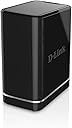
The D-Link Network Video Recorder (DNR-312L) is a cutting-edge standalone storage device designed to support up to 16 network cameras with resolutions up to 3 Megapixels. Featuring two SATA HDD bays for a total of 8TB storage, it offers seamless remote access through the mydlink Cloud and is compatible with various mobile devices. With advanced compression technology and motion detection recording, this NVR is perfect for modern security needs.


N**H
Purchased this item in February. It has worked essentially ...
Purchased this item in February. It has worked essentially flawlessly for 4 months and now does not function. Tried replacing drives etc, contacting customer support, to no avail. Would be 5 stars if it hadn't failed or if D-Link would support the product.----Finally recieved reponse and was able to exchange the system. Working flawlessly again and changed review to 5 stars.
J**Y
A great product that has multiple uses
A great product that has multiple uses. The DVR works great but be for warned it only supports Dlink cameras. Get second hard drive and use it for network storage. If this device accepted 3rd party internet cameras it would have gotten 5 stars.
A**N
Set up for [cameras + recorder] was difficult, but tech support was fantastic.
I purchased 2 DCS-5029L cameras for surveillance and a DNR-322L to record. I set them up together, so I am combining the two reviews into one. This is somewhat of a preliminary reviewā¦I had to make sure the cameras were set up and working with the software before I had them mounted (which Iām very glad I did)ā¦Iām still waiting for them to be mounted, so I havenāt actually used them since the set-up. This review is mostly for the process itself and how the products worked in the short while I had them up and running.The set-up of the cameras themselves was pretty seamless. They are wireless, but I had to connect each one via Cat-5 so they would be recognized, and then I was able to disconnect the cables and I could still see them on my phone (I currently utilize the D-Link Lite mobile app). I could also set the DNR-322L up on its own, and see it on my phone.The problem arose when I tried to connect the cameras to the recorder. Per the cameras, in order to be able to see them on my phone, I was required to name and enter a password for each one. No big deal. However, per the DNR, I was required to have each camera named āadminā and could have NO password. If I tried changing the camera info after I had it set up, then I could not access it. I deleted and reinstalled the cameras twice before calling tech support.The calls were answered pretty quickly after the initial hold (even though it said I could be waiting 25 minutes each time I called). I had to speak with the consumer side for the cameras, and then the āBusiness Classā for the recorder, so it could not be done all in one call. A little frustrating at the time, but understandable because they are different products, and the technicians are trained on specific items, which I think worked out well because they were each very knowledgeable on their products. I spent a good 2 hours if not more on the phone, but it was worth it.Greg helped me get the cameras set up and able to be recognized remotely (the way the recorder needed them), which required IP addresses and other fun stuff. He was a great help and had no trouble walking me through everything. Then he sent me over to the Business Class side, where Kurt helped me get the DNR set up to recognize the cameras; this required an IP address as well. Kurt was also great.Overall, the process took maybe 4-5 hours (all-inclusive, not just the phone calls). If I had to do it again, I might be able to remember the whole process, but at least I know that tech support will be there for me if I canāt. There were two phone calls for the cameras (donāt remember why), and one for the DNR. Cameras (Greg) case #s C6713865 & C6713886; DNR (Kurt) case# C6713900.A little bit of brain damage but, by the end, I was able to see both cameras from my phone (and pan/tilt/zoom them remotely), and I could access the DNR either by IP address (on the same network) or via the mydlink website and view what it was recording. (By the way, I got (2) 2-TB hard drives for the DNR, and that part of the set-up was relatively simple.)
W**S
Unfortunately, it just wouldn't work.
I tried for months to get this thing to work properly. I made calls to technical support every few weeks. After the first call they concluded there was something wrong with the unit and replaced it. The new unit did not function properly either. Recordings were inconsistent, would stop for no apparent reason and not restart. Playback of recorded video was complicated and choppy. Compatibility issues with both IE and Chrome occurred. Certificate warnings were also occurring. All of this has been documented in the tech notes. Updates to the firmware would not install even when performed by the tech at dLink. The final straw was when the tech told me she needed to consult with superiors and would call me back. She never did. It is a shame as she was very nice and seemed knowledgeable. But this product is just no good. I have exceeded the Amazon 30 day return period so I am trying to get dLink to make good on it. We'll see.
R**L
Great potential, but apparent software bug
Update on Feb 4 2016: NOT A BUSINESS SOLUTION.I ended up replacing the unit, which at least allowed firmware upgrade. Be aware of:- Unless you have Internet Explorer and Active X with all required drivers installed, configuring the device is impossible. Most of my firmware upgrade attempts failed until I figured this out. Still nowadays, trying firmware updates often fails.- Despite of having all firmwares in DNR-322L and Cameras upgraded to lastest versions available, this DNR-322L may likely not find your D-Link cameras connected to your network. Some camera models will not even show up in the list for manual setup - despite of latest upgrades. Eventually I got some of my cameras to work with this device by trying to select models from the list with "closest" model number- EVENT ALERT/EMAIL DOES NOT WORK. You will need to set it up on EACH camera if you want to know something happened.- You can verify I am not alone. Go to forums.dlink.com and search for 62359. You will see very similar situation faced by others.- NOISY. It was probably designed for traditional hard disks, so its fan is constantly going off and loud - about 40dB, louder than most computers, enough to be heard in a quiet room.- 2 years owning this device, I lost any hope on D-Link`s ability of making their device's firmware improved over time.Based on the trust I built on D-Link older products, I bought a set of cameras with this DNR-322L hoping to have an easy and reliable way to record, search, and monitor (alert) events and remotely inspect multiple cameras. Had I known all I would get is basic remote access and storage, and the lack of improvements to their buggy products, I'd have gone for something else.-------------------------I bought this NVR hoping to have 6 cameras connected and recording. First thing is that it would not recognize the camera (DL-932L) automatically. I went to D-Link support website and noted there were different versions of firmware. The device came with a label saying firmware 1.4, when two versions 2.x were available. By trying to update I noticed the device actually came with version 1.3, and would not take the latest versions. I then upgraded to the next (1.4), then to the next (1.5) and again, it failed in every attempt to upgrade to either of the two version 2.x.By contacting D-Link support, I was told I should contact D-Link in Brazil - I guess because my e-mail address has brazilian domain. After explaining I live in the US and wanted to connect cameras, but noticed the firmware issue, the same support agent wanted to work on the cameras and not the fact the device does not take upgrades to firmware version 2.x.Last, I was asked to call a number that gives me different menu options, and by leaving a message I have not heard back from anybody in D-Link. The product looks defective, I've tried the upgrade from different computers, connecting the computer to the same ethernet switch as the NVR, nothing seemed to help. Additionally, on the home screen for Live View I keep getting a message to install MS C++ 2005 bla bla bla that I have tried to reinstall on my computer, but after trying to access from another computer, noticed it keeps prompting the same message regardless.I'm willing to replace this device hoping it was just a detective unit, otherwise, so far it has been a lot of work not worth the money invested.-------------
Trustpilot
1 month ago
4 days ago