Buy anything from 5,000+ international stores. One checkout price. No surprise fees. Join 2M+ shoppers on Desertcart.
Desertcart purchases this item on your behalf and handles shipping, customs, and support to Iceland.
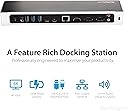
🚀 Triple your screens, not your clutter—power, connect, and conquer your workflow!
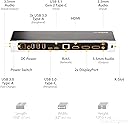
The StarTech.com USB-C Triple Monitor Docking Station transforms your laptop into a powerhouse workstation with three 4K video outputs, 100W charging, and a comprehensive USB 3.0 hub. Compatible across MacBook M-series, Windows, Linux, and ChromeOS, it supports high-resolution displays and advanced IT features, making it the ultimate productivity upgrade for professionals demanding seamless multi-display setups and robust connectivity.


| ASIN | B07LGR8Y14 |
| Best Sellers Rank | #22,092 in Electronics ( See Top 100 in Electronics ) #340 in Laptop Docking Stations |
| Brand | StarTech.com |
| Built-In Media | Triple-Monitor 4K USB-C Dock with 5x USB 3.0 Ports - 100W PD, 1 x USB-C Cable, 1 x Universal Power Adapter (NA/JP, ANZ), 1 x Instruction Manual |
| Color | Black, Silver |
| Compatible Devices | Apple MacBook Air M1/M2/M3/M4, Apple MacBook Pro 13 M1/M2/M3, Apple MacBook Pro 14 M1 Pro/M2 Pro/M3 Pro, Apple MacBook Pro 16 M1 Pro/M2 Pro/M1 Max/M2 Max/M3 Pro, Apple MacBook Pro 15 2019/2018/2017/2016, Apple MacBook Pro 13 2020 Intel/M1, Apple MacBook Pro 13 2021 M1 Pro/M1 Max, Apple MacBook Air 2022 M2, Apple MacBook Pro 14 2021 M1 Pro/M1 Max, Apple MacBook Pro 16 2021 M1 Pro/M1 Max, HP Spectre x360 13-aw0000/13-df0000/13-af0000/13-ap0000/13-ba0000/14-ea0000/14-df0000/14-cd0000/14-bc0000/14-bd0000/15-df0000/15-eb0000/15-bl0000/15-ds0000/15-ch0000, HP Elite Dragonfly G2 2B5G1AV/2B5G2AV/2B5G3AV, HP Elite Dragonfly G3 3B5G1AV/3B5G2AV, HP EliteBook 830 G7 Intel/AMD, HP EliteBook 830 G8 Intel/AMD, HP EliteBook 840 G7 Intel/AMD, HP EliteBook 840 G8 Intel/AMD, HP EliteBook 850 G7 Intel/AMD, HP EliteBook 850 G8 Intel/AMD, HP Envy 13-ba0000/13-df0000/13-ap0000/14-eb0000/14-df0000/15-df0000/15-cd0000/15-bc0000, HP Envy x360 13-bd0000/13-dq0000/13-cb0000/14-bd0000/14-ce000 Compatible Devices Apple MacBook Air M1/M2/M3/M4, Apple MacBook Pro 13 M1/M2/M3, Apple MacBook Pro 14 M1 Pro/M2 Pro/M3 Pro, Apple MacBook Pro 16 M1 Pro/M2 Pro/M1 Max/M2 Max/M3 Pro, Apple MacBook Pro 15 2019/2018/2017/2016, Apple MacBook Pro 13 2020 Intel/M1, Apple MacBook Pro 13 2021 M1 Pro/M1 Max, Apple MacBook Air 2022 M2, Apple MacBook Pro 14 2021 M1 Pro/M1 Max, Apple MacBook Pro 16 2021 M1 Pro/M1 Max, HP Spectre x360 13-aw0000/13-df0000/13-af0000/13-ap0000/13-ba0000/14-ea0000/14-df0000/14-cd0000/14-bc0000/14-bd0000/15-df0000/15-eb0000/15-bl0000/15-ds0000/15-ch0000, HP Elite Dragonfly G2 2B5G1AV/2B5G2AV/2B5G3AV, HP Elite Dragonfly G3 3B5G1AV/3B5G2AV, HP EliteBook 830 G7 Intel/AMD, HP EliteBook 830 G8 Intel/AMD, HP EliteBook 840 G7 Intel/AMD, HP EliteBook 840 G8 Intel/AMD, HP EliteBook 850 G7 Intel/AMD, HP EliteBook 850 G8 Intel/AMD, HP Envy 13-ba0000/13-df0000/13-ap0000/14-eb0000/14-df0000/15-df0000/15-cd0000/15-bc0000, HP Envy x360 13-bd0000/13-dq0000/13-cb0000/14-bd0000/14-ce000 See more |
| Customer Reviews | 4.1 out of 5 stars 320 Reviews |
| Global Trade Identification Number | 00065030879996 |
| Hardware Interface | DisplayPort , HDMI , USB 3.0 |
| Input Voltage | 240 Volts (AC) |
| Item Dimensions L x W x H | 10.6"L x 3.2"W x 1.3"H |
| Item Type Name | Docking Station |
| Item Weight | 0.84 Pounds |
| Manufacturer | StarTech.com |
| Number of Ports | 14 |
| Product Dimensions | 10.6"L x 3.2"W x 1.3"H |
| Total Number of HDMI Ports | 1 |
| Total USB Ports | 6 |
| Total Usb Ports | 6 |
| UPC | 065030879996 |
| Unit Count | 1.0 Count |
| Warranty Description | 3-Year |
| Wattage | 100 |
D**K
A fantastic solution to turn your Apple laptop into a desktop solution.
Well made, solid, and most importantly, it works. I have a strange monitor configuration where the three monitors look identical, but look at the inputs and you'll see they're all a slightly different model. This StarTech dock aligned perfectly (two DisplayPort, one HDMI) to the monitors I have. The first thing I noticed when unpacking it, it feels solid and of high quality. I'm using it with a MacBook Air M1, which my first concern was using a single USB-C cable to connect two keyboards (regular keyboard and a numpad), a mouse, USB speakers, USB headset for conference calls, three monitors, and power the laptop .... but it works, and it works well. There's no delay in typing and seeing characters appear on the screen, no audio delays, this dock truly met or exceeded all of my expectations. You will need to install DisplayLink, which gets around the two monitor limitation imposed by Apple by treating the third monitor as a screen share. The good news, you can still mirror your display to another device, you can still mirror your iPhone to the computer, but you cannot have an Apple Watch auto unlock your computer anymore. Again, these are limitations imposed by Apple, so having three monitors working and I have to type my password in ... perfectly fine with me.
T**I
Universal docking station for USB C, USB A and TB3
With the Covid situation going on, I am working from home and I needed a docking station for configuring a dual display set up. I had a startech docking station in office and The office desktop support folks recommended startech for my personal macbooks. I got a loaner from office but it had a TB3 cable and didn’t support my MacBooks. I have a 2017 MacBook with USB C and a 2015 MacBook Pro with USB A. I needed a docking station that could support both. On a whim, I started a chat with the tech support on the startech website. The guy was very knowledgeable and really patient in answering my questions and recommended this docking station instead of buying a bunch of adapters. Although @ $300 this is on the high end and pricy, I decide to give it a try. I configured all peripherals and downloaded the displaylink beta 0.5 version(latest) for OSX 10.15.4. The display works like a charm. Although I am having some problems with the sleep(clamshell) mode of Mac( my laptop locks after a few second after I shut the screen and upon unlocking it, again locks it after a few seconds. The right configuration is done in the energy saver ) I don’t have any complains about the docking station so far. It does support both the 2015 and 2017 MacBooks. Also I have tested it with a windows laptop with TB3 port and it works fine. PS: I will post an update, when I figure out the issue with the laptop locking down. This does seem like a great universal docking station.
A**R
Great so Far (Update: 4/15/2020)
I mainly got this to expand my MBP from just x2 TB3 interfaces to what all this dock offers. Getting a pair of DisplayPort->DVI cables and hoping this product can support that. I don't see why it wouldn't be able to but will follow back up. Haven't used much else on it as I intentionally bought it to expand my screen real estate.. Update - 4/15/2020: This product works well for the most part but am not happy with the latest discovery. For starters, I bought this docking station specifically for the RJ-45 interface - the rest of the options were a plus. Longer story short, I used it just fine to power x2 external displays via DisplayPort and a hard wired internet connection. Today, however, when I tried to use the charging port on the side of the device, my internet connection kept dropping and it was very frustrating. Aside from that, my screens and internet connection have been doing just fine this whole time. This recent discovery isn't a make it or break it thing but am disappointed. Wondering if the 100W variant would have been better but didn't expect this.
M**S
Does not work reliably with Dell XPS 15 9560
This dock does not work reliably with a Dell XPS 15 9560 (i7, 32GB RAM 1TB SSD) with two Dell 4K monitors. There are multiple issues. The latest drivers were downloaded and installed. Audio from the dock is extremely unreliable. Even though the Audio Mixer says the audio is through the dock, nothing happens. Reboots do not help. Video on the 4K monitors is great when it works. Sometimes one monitor will display video, sometime two, once in a while none. A reboot might or might not fix the issue. Then there is the USB keyboard problem. I am using a wired USB keyboard. Randomly it will backspace or delete characters while working in Word. Can't figure this one out. If the keyboard is plugged directly into the XPS 15, there are no issues. Mouse is sluggish. Again, plugged into the laptop directly there are no issues, even through a USB hub. Sent back as defective.
C**E
A solid dock, with some quirks
I purchased this dock alongside a new Razer Blade Stealth a few weeks ago. Thus far it has proved to be reliable and dependable for what I need except for two quirks-- one, setting it up with mismatching displays initially can result in some weird display behaviours, this is minor, and will go away once the system settles once plugged in during subsequent usage. The other, more at times frustrating quirk, is the audio. Using my headphones through the jacks on the back of the dock, I occasionally have to unplug and replug the laptop in typically once, but sometimes more, to get the audio to NOT be choppy/skippy over the headphones. This is a bizarre quirk and I've only been able to see fringe cases with other thunderbolt docks of this happening. Not sure if this is the dock itself, a quirk of the laptop, or a problem with Thunderbolt 3, but while minor, it can be irritating to constantly fix if you frequently dock and undock a laptop.
P**X
Does the Job but would not recommend
Tried it with Macbook Pro 16 Inch. Things to know PROS 1. You can run 3 displays of a single USB cable. 2. Charges your laptop Cons 1. This will not wake ur laptop from shut down state. 2. You need to yank multiple cables multiple times to get it working. Returned this.
J**S
Compatibility issues
The DK30CH2DEP docking station is the perfect mix of what I was looking for as far as ports go. It is a USB-C docking station. I received the first one, plugged my new Dell XPS 9300 laptop up and the laptop started power cycling as if the power cord was being connected and disconnected repeatedly. I called Dell Tech Support, spent almost six hours on the phone with them, updated the BIOS and several other firmware items for Dell to tell me my computer was operating as it should and to call StarTech Tech Support. I began an online chat that turned into a phone call and within 20 minutes it was determined I had a "dud" docking station by the tech support guy. I requested a return through Amazon and the replacement docking station was shipped the next day. I received the second DK30CH2DEP docking station within 10 days (APO address) and it did the exact same thing. I started a chat with StarTech Tech Support, ran through a couple of checks, and the guy asks me to please wait before returning the item so their products team can trouble shoot the issue. It took almost a week for them to send me an email saying they found a "possible" solution and they would ship me a third docking station with "updated" firmware to correct the power issue. They seem to think there is an issue with the power delivery difference between my XPS 9300 that has a 45W Thunderbolt 3 power cord and the 100W USB-C power delivery system of the docking station. I have connected to a HP G5 5TW10UT#ABA 100W USB-C docking station and it works flawlessly. The reason for the 3 star rating is lack of compatibility that is not listed and the fact that two brand new DK30CH2DEP docking stations would not "out of the box" work with a brand new Dell XPS 9300 laptop running Windows 10.
M**Y
6 Stars—good product and great tech spt; need to install drivers
Windows 10 didn't automatically install the drivers needed to use the display port outputs. Once I discovered that, all was well. The startech.com website was reasonably easy to navigate to find the needed driver. Installation was straightforward. The product is performing well. I tested all the ports. I do wish it has a couple more USB-A/USB 3.0 ports, but I'll manage--this just made my laptop (a well equipped 2018 HP spectre x360) into a solid workstation (driving a 2 24" 1080p displays in addition to the laptop's built in 4k display. In case this is of use, when I tested the HDMI output, it was pushing the 1080p picture at 60Hz. I couldn't find anywhere in startech's specs what the refresh rate was at 1080p (it lists the 4k HDMI at 30Hz so I was a little worried the HDMI chipset might be underpowered, but it looks just fine. Update—thought it had died, and thought trying to get tech support was going to be a frustrating and useless step—I was so wrong. Online chat support easily transitioned to an online call and remote diagnostic connection—with a North American English speaking person and someone that quickly stepped through reasonable questions and steps. Figured out that I’d accidentally plugged my laptop USB-C into the wrong port (only one of the two on the hub supports the laptop main connection—and if you connect it to the second port, none of the other ports are connected—so it looked like the hub wasn’t working! Overall—best tech support and commitment to the product that I’ve experienced in a long time and very easy to get support. I will shop for Startech stuff first for any of the products they sell.
Trustpilot
2 months ago
1 week ago