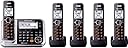
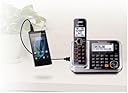
📱 Stay Connected, Stay Ahead!
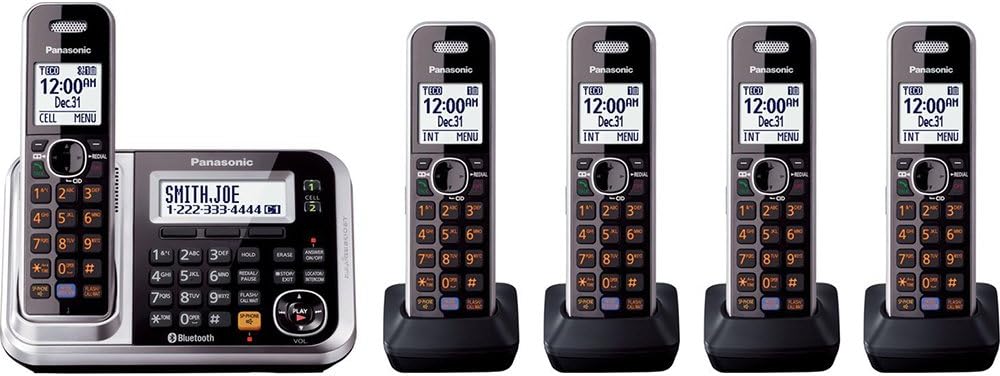
The Panasonic Bluetooth Cordless Phone KX-TG7875S is a versatile communication solution for home or small business use, featuring five cordless handsets, Bluetooth connectivity for smartphones, a digital answering machine, and advanced noise reduction technology. With USB charging capabilities and a talking caller ID, this phone system ensures you stay connected and informed, no matter where you are.


| ASIN | B00BP7SW0C |
| Answering System Type | Digital |
| Best Sellers Rank | #168,768 in Office Products ( See Top 100 in Office Products ) #397 in Landline Phones |
| Brand | Panasonic |
| Built-In Media | LINK TO CELL W/PSTN TAD, PB TR |
| Color | Black/Silver |
| Compatible Devices | Bluetooth-enabled smartphones |
| Conference Call Capability | 5 way |
| Customer Reviews | 4.4 out of 5 stars 11,828 Reviews |
| Dialer Type | Dual Keypad |
| Enclosure Material | Plastic |
| Global Trade Identification Number | 00885170106246 |
| Is there Caller ID | No |
| Item Dimensions | 4.6 x 7.1 x 6.7 inches |
| Item Type Name | Cordless Phone System |
| Item Weight | 2.9 Pounds |
| Manufacturer | Panasonic |
| Material | Plastic |
| Mfr Part Number | KX-TG7875S |
| Model Number | KX-TG7875S |
| Multiline Operation | Single-Line Operation |
| Number of Batteries | 10 AAA batteries required. (included) |
| Phone Standby Time | 8 days |
| Phone Talk Time | 10 Hours |
| Power Source | Corded Electric |
| Recording Capacity | 18 Minutes |
| Telephone Type | Cordless |
| UPC | 885170106246 |
| Unit Count | 1.0 Count |
| Warranty Description | One year parts & labor |
W**S
Review of the Panasonic Link2Cell Bluetooth phones
Previous, we’ve owned two sets of wireless Panasonic home phones. The most recent was a forerunner version of the Panasonic Link2Cell Bluetooth phones. Base upon our experience one can expect these phones to last approximately five (2009 to 2015) to eight (2000 to 2008) years. This life expectancy is typically longer than most people keep their cell phone, so when you project the cost out over the years it seems pretty reasonable. Some issues with the old phone system were: push buttons stopped working, ringers on some of the phones stopped working and the speaker phone on one of the phones stopped working. The old system didn't allow for adding an additional phone, but this system allows for adding an additional telephone. Further, the old phones were quite limited with the number of names and phone numbers that could be stored in them. Though we've only had the new phones for a couple of month, the new system seems to be satisfactory. There are many more features with these phones. The set up for “programming” or setting up the various features could initially be intimidating but it is really not that difficult. It is based upon entering #, followed by the appropriate code number. All the codes are included in the Operating Instructions. It maybe a little confusing if you've never used such a system, but it is relatively straightforward after going through a couple of entries. Just make sure you hang onto your Operating Instructions. We have not and do not intend to link this system to our cell phones through a Bluetooth connection. Voice mail is a component of this phone system as well as our cell phones. Missing a call on occasion isn’t a crisis - in fact, sometimes we don’t want to answer either. Pros You may use the prerecorded greeting for voice messages or you can make your own. I like the voice caller ID, though it does come up with some rather amusing pronunciations. As with our previous Panasonic systems, the names and phone numbers need only be entered into one handset. Once entered, they will appear in all the handsets. We like the call “block feature” - it allows you to apply the call block to those repeat offenders you don’t want to hear from. The “missed call” feature captures the phone numbers of all incoming calls. This allows you to pick those numbers you wish to add to the call block. It also allows you to call back those numbers you wish. A flashing light on the base set provides notification of new messages. I understand that you can have the phone provide beep alerting you for as well. These features can be turned on or off by changing codes. You have the ability to “name” each handset, i.e., study, bdroom, shop, kitchen, etc. and each handset is numbered. The intercom feature allows you to speak from one handset to another, i.e., from the kitchen to the shop. However, I think the most important function of the intercom is as an aid to find misplaced handsets by calling the missing handset. When the livingroom handset disappears, it’s easier to find it underneath the cushion on the couch using the intercom. The reception of the wireless units is satisfactory for our purposes. I have one handset in my shop, a metal structure, approximately 103 feet away from the kitchen base unit (yes, maybe a bit anal retentive, but I measured it). I have read reviews to the contrary - all I can say is: mine works fine at that range. The Panasonic Link2Cell Bluetooth phones can store up to 3,000 names and telephone numbers, which is far more than any of the previous Panasonic phones we’ve owned. We like the speaker phone feature of these phones. These phones are also equipped with a noise reduction button on the handset to reduce background noise coming from the other party’s telephone. The handset also has a “handset equalizer” that supposed to help make it easier to understand the person you’re speaking with. I’ve used the noise reduction feature but not the handset equalizer. Does the noise reduction feature work? Probably/maybe. When I used the noise reduction feature, I could hear the person to whom I was speaking - I cannot actually say it made it easier for me to hear them . . . but I could hear them. This phone system has many features - many more than I’ll ever use . . . but you can if you wish. Cons There are three options to store numbers in the Phonebook: Home, Cell1 and Cell2. This feature is fine for those who wish to pair their cell phones with this system, but we don’t. To expedite finding numbers, we store family members as “Home,” friends and other frequently called numbers are stored in “Cell1,” and businesses are stored in “Cell2. ” I’d prefer to be able to name the categories, but that’s a minor issue. While there is a flashing light on the base unit to provide notification of new voice messages, the only notification on the handsets is a message that appears on the screen, “New Message Press PLAY.” While this is better than nothing, it could be easily over looked. Previous systems had a flashing light on the handsets as well as the base unit. The back lighting of the keys could be improved, as they are difficult to see, particularly if you answer a call at night in the dark. One has to rely more on familiarity with the phone than actually being able to see the buttons. Summary This phone system has been better than I expected, so far. We’ve had no issues with it, but it is still relatively brand new. As the owner of two earlier wireless Panasonic phone systems, I had an idea of what I was getting and what I expected. To date, this system has been superior to our previous Panasonic systems and it has more PROS than CONS.
J**N
A Very Good Cordless Phone for Those Wanting Home Extensions without a Landline Phone
I've really enjoyed using this phone as I was forced by my former carrier to drop my landline service. I just have no interest in carrying my phone around the house, and this provides easy extensions in both bedrooms and the kitchen. I did run into the complaint that seems common in the reviews and that is the weird Bluetooth distance issue. The cell phone needs to be a few feet away from the main base and it would be more convenient to have the cell right next to the base. If the cell is more than 15 feet away from the base, you do get static and issues with number button presses not being transmitted, although that's more of a general issue with Bluetooth technology. I have had zero issues with extensions being too far from the base, however, within reason. I was easily able to set up my existing Android phone with this device. I was also able to set up text message alerts, although setting up the extensions was a bit complex. Copying the Phonebook from my Android phone did not work; I had to retype the entries on the phone, although those entries did automatically copy over to the other extensions. Plus, after a great deal of effort, I was able to port my old landline number to a flip phone running KaiOS, and it also paired with the Panasonic! An unexpected bonus, indeed. For those looking to port a landline number to a cell carrier, give the process about one month, and assume daily calls to both parties (plus, the Real Caller ID system set up on cell carriers will reduce junk calls to the old number). The speaking Caller ID is a huge positive for me at least, though I couldn't get the different ring tone feature to work the way I wanted it. The first ring is the default tone, then the Caller ID announces the name (if it's in the phone book) or the number, and then the appropriate ring tone programmed into the phone then sounds. There are a few suggestions for future models: (1) while the call blocking & answering machine features are very good, I just don't use them. I think that most people use these services on their cell phones because you can use those services away from home. There should be a cellular-only model without these features, because having them makes the phone more complex to set up. Plus, landlines are becoming unavailable in populated areas, including having the service forcibly removed from people's homes; there won't be a need much longer for these features. A third cell line addition would also be nice, if possible. (2) The Android app & the ability to get an alarm on an incoming text message was a requirement, but there are a couple of suggestions. First, have an option to repeat an alert after a couple of minutes automatically until cancelled on an extension. Second, it would be the best phone on the market if a user could view at least a portion of the text and reply to a message from an extension, at least an acknowledgement or a choice of canned replies. Actually being able to type a text back using old-school 12-button typing would be wonderful. (3) A less important suggestion: please propagate dial out histories to the other extensions, but include a menu choice to delete all of them & automatically propagate deletions to the other extensions. But in summary, this phone is a market-changer, traditional DECT cordless phones that connect to cell phones using Bluetooth is going to make the forced transition away from twisted-pair copper service so much easier.
L**M
Not a bad phone, but quirkey...
Not a bad phone at all. It may have too many features to suit some folks. The ability to link 2 cell phones simultaneously to it is kind of neat, but for some reason I could never get the second phone (both are iPhone 6's) to pair. The cell phone could see the phone base station but the base station just sat there and did nothing. Oh well, my wife rarely gets calls on her cell. The overall quality of base unit and individual phones are good but compared to the AT&T set that I'm replacing it feels a little cheap. I had to buy a 6th phone to use in my workshop but it is slightly different from the phones that come with the set. The trim is all black on the extra phone whereas the phones in the set are finished in a satin brushed aluminum trim. Doesn't effect the phone's features but you would think that for $35.99 (which is about 1/3rd the cost of the entire 5 phone set) it would match it. BTW, it is the recommended model as an add-on to this set. I also purchased the range extender as I was not sure as to how far I could get from the base station to work. I had an issue in my workshop with the old set where it would fade out in certain spots. I first set it up half way between my workshop and the base unit but it never synced with it. I moved it about 10 to 12 feet closer to the base unit and it worked fine. So far the overall system has worked fine. There is good selection of ring tones and each handset can have their own ring tone if desired. The audio speaking of the incoming caller ID is OK, but a little annoying. It literally says the caller name which some come in with last name fist (not the phones fault), or the computer completely butchers the name. What's interesting is you can turn it on or off for each handset. So some might have it on and others have it off. There are some goofy things about the phone that make it obvious that little or no systems engineering was done when specifying this system. For example, when you a missed call it tells you "SEE CALLER ID". But there isn't one, its actually labeled "CALLER LIST". A little confusing. Another thing that seems to be weird is the erase feature for missed calls. You can erase a missed call, well more or less. Sometimes it will erase it and other times it doesn't. If doesn't erase it, it puts a check mark next to it and then when you turn the phone "off" it apparently does erase it. However, the erase all works perfectly. If you pick up the phone, turn it on, then shut it off right away and return it to the charging unit, it charges, and charges and charges. Overall, its a little quirky system but the sound quality is exceptionally good and it use 2 AAA Ni-MH batteries (not proprietary) which are fairly inexpensive, though don't have a long life span (especially if the darn thing is charging all the time). Expect to spend a lot of time reading the manual and become cross-eyed in the process.
A**R
NIce phone.
Bought them for the Bluetooth so I wouldn't have to pay for a landline. Works well and the sound quality is better than the ATT that I had before. Easy to set up. Have been very happy with them. I would recommend.
M**2
Finally, a good set of cordless phones again.
Well, I finally wore out my old set of Panasonic cordless phones. I dropped them once too often, including one that took a dive into my toilet, (don't ask). Besides, they were on their second set of batteries so that might give you a hint as to how old they were, not to mention that I originally bought them used from the Goodwill. Of the original 5, I had only one good one left and it was dropping every other word during a call. So, I checked Google to see who had the highest rated cordless phone and guess what, it was Panasonic (no surprise there, based on my experience). The Panasonic Bluetooth Cordless Phone KX-TG7875S Link2Cell with Enhanced Noise Reduction & Digital Answering was the highest rated on all of the rating sites that I trust. None of this paid rating BS that is so prevalent today. The thing that I hate the most about getting a new phone set, of any sort, is having to re-input my whole phonebook. Now most people, who are used to cellphones, often forget that there is usually no way to move numbers between regular phones. With a cellphone, you just swap sim cards and Bingo, your all set. With most regular landline phones, you haul out the old phone (if it still functions) and laboriously transfer all of the names and numbers, one at a time into the new phone. About 2 hours later, depending on how many friends and relatives you have, you're done. "But wait", he said, with the Panasonic Link to Cell feature, I was able to transfer my entire Google Contacts List into my new phone, in mere seconds, using my cellphone. It did take me about an hour to figure out how to link my cellphone to the base unit, but that was partly my fault. I was diligently following the instructions from the included manual but failed to note that you have to use a handset to input the pushbutton codes, not the base unit buttons. It said "handset" in the instructions, but I missed that little fact since there is the same pushbutton pad on the base unit and I was trying to link to the base unit. Once I figured out my mistake it was a piece of cake setting up the phone. The base unit will handle 2 separate cellphones or a cellphone and a Bluetooth headset. Setting up the Bluetooth link was kind of fiddly. It took a few tries and I think the trick was to keep the phone a bit away from the base unit when pairing. It even says that in the instructions (but who reads instructions). Once paired, you can receive or make cellphone calls from your Panasonic handset. Be sure to turn off the auto answer on the phone or it will automatically answer with the cell. I still have some features to figure out with the unit, since it does so many nifty things. If you don't have a landline, you can use the unit with only a cell phone. After linking the base you have as many as 6 handsets available for your cellphone. This is great for people who live off the grid or only have cellphone service, something that is becoming more and more common. I use a voice over IP, phone service (VOIP) called Ooma. I plug the Panasonic base into my Ooma box and I have phone service in any room of my house. Previously I used a Magic Jack and I just purchased an ObiHai box that uses the Google Voice service. The ObiHai should let me use my cellphone as a WiFi phone through the Panasonic base to the ObiHai allowing me to use my cellphone as a regular handset on my VOIP system, a great feature since I rarely use my cellphone and do not have unlimited minutes. Sounds complicated. It is, but once I get the kinks worked out it should work great allowing me to access my VOIP service from any phone, cell or cordless. The bottom line is, I love my new Panasonic cordless phones. My friends no longer hear every other word I speak, making for better conversations, and my batteries now last for days, making it a lot harder to lose one of my handsets in my house or shop. Don't laugh, it's happened too many times. Also, I bought one of the Panasonic KX-TCA430 headsets, making for wonderful, hands-free conversation wherever I happen to be in my home or shop. BTW, my phone system is also connected to my smart home so I can use the Panasonic to answer my front door or talk to any room through the intercom system, all by pushing buttons on my handset. Did I mention, "I love my new Panasonic cordless phone system"?
A**R
Great sound quality but some features poorly designed
We only use this as a land line phone for about a month. We haven't tried using the blue tooth nor the cellular link features. We purchased the Panasonic system in an effort to resolve the problems of occasional intermittent garbled sound and sound "cutting in and out". These phones have very good sound quality, but on over half the calls we still have the problem of occasional garbled sound and "cutting in and out". We've tried moving over 10 feet away from all other electrical devices, but nothing has worked to prevent these problems. Commonly used commands such as deleting individual voice messages are not listed as an option on the display menu on the handsets (only the command for "delete all messages" is displayed), instead you just have to know that you press *4 or find the information in the owners manual. There is about a 6 second delay between sending a number and when the call connects - an annoying feature when all other phones, v-tech, sony, samsung, etc connect within 1 - 2 seconds. This is the first phone we've encountered where the redial feature does not work for phone numbers where in the original call we responded to the automated answering system by entering number options after the call connected. When using the "redial" feature for those calls we get an error tone and an announcement stating "This call cannot be completed as dialed". The speed dial feature is limited to 9 phone numbers. We found this disappointing since our other phones had allowed speed dial for at least 100 or more phone numbers. One nice feature of this system is that it allows you to group phone numbers according to "Home", "Cell 1", and "Cell 2", thus expedites finding a number in the Phone book. Unfortunately, if a person has multiple phone numbers, you have to re-type the name with each of their phone number entries when adding to the Phone Book. There is no way to enter the name once then enter all phone numbers for that person. We prefer the display to continue to show the number dialed so if for some reason we question whether we've mis dialed, e.g. the voice mail message doesn't match the person we are calling, we can easily verify the number we've dialed by just looking at the display. But with the Panasonic phones the display stops showing the number dialed before the call connects. We have to hang up and check the number we dialed by accessing the redial feature. We've called Panasonic for support twice. The representatives speak english well but the quality of help is mixed. Update 7/28/15 - We've had this for almost 8 months and the "redial" lettering is wearing off. We use if for home use so we probably make no more than 5 to 10 calls/week.
N**D
Pretty Darned Good
I bought this to replace an older Panasonic DECT cordless phone when we moved and we needed more handsets, and of course, it was cheaper and easier in the end to replace the system rather than buy 2 old handsets. Overall, this system seems to work very well, and is easy to use if you keep the manual handy and read it at need. Because it has many features, you WILL need the manual, although once you delve into the menus, much of the programming is simply a matter of following the screen prompts. Remember, you can have flexibility or simplicity, but not both simultaneously. Setup is simple. Plug in the units, let the handsets charge for at least 7hrs, and you're good to go. Like all cordless systems, the base unit must be plugged into an RJ-11 phone jack, but the other handsets can be placed anywhere in range where there is an electrical outlet. I have not specifically tested the range of these units, but it has not been an issue thus far in a generously sized condominium. Programming frequently called numbers is easy, either manually, or doing it from your cell. I did some both ways. You can enter the info yourself, or if you get a call from someone, you can easily do it from the caller ID log. I didn't want all the contacts from my cell, but the system let me choose the ones I wanted and transfer them easily. If you want all your contacts, the system will do it all automatically. The numbers from the cell came over with only one hitch - businesses (with no individual's name) came over without a name. Overall, getting the names and numbers into the system was fairly painless. And you only have to program the names once. All the handsets have the information once programmed any handset. Finally, there is room in memory for the numbers of 3,000 of your closest friends. Sound quality is very good, and the intercom feature is very handy, and easy to use, The voice announcements from the caller ID system are impressively clear, and much less mechanical sounding than on older systems, and names are more likely to be correctly pronounced. The handsets user friendly, with an easy-to-read screen, and appropriately sized keys. The keypads ARE back-lit, but the keys themselves are opaque, and the light is visible only around the edges of each key. The pictures on Amazon clearly suggest that the numbers on the keypad are lit directly, and this is incorrect. Although the way it is designed is adequate, the keys themselves being lit would make them more visible in the dark, as is the case with some other systems. As someone who is on call, and needs to make calls at night without turning the room lights on and disturbing my wife, this is an important feature to me. If I could ding them half a star, I would for this design feature, but since I have to choose four or five stars, not four and a half, I'll be generous given the multitude of other useful features. One of the most useful features of this phone is the ability to block call from up to 250 individual numbers. When you get an unwanted call, such as the innumerable calls during the recent election, the process of blocking them is very easy. This was an important factor in my choice of phones, and I have already begin the process of blotting this blight from our lives. And once programmed, you can opt to block the phone from even ringing once when you receive a call from a blocked number. Bye-bye, robocalls, telemarketers, surveyors, etc.! The answering machine seems to work fine, and is pretty straightforward.There are other features which I haven't used yet, such as making or receiving cell calls (don't know if I'll ever use that feature). Overall, I don't think you will go wrong with this system.
J**S
This Phone System comes with an unadvertised UNINTERRUPTIBLE POWER SUPPLY. Also read my GREEN TIPS to save money.
Contents of this review: 1. Free Uninterruptible Power Supply for the Base Unit 2. How to extend the battery life by several factors (Green Tips, Saving Energy) 3. My short review ============================ UNINTERRUPTIBLE POWER SUPPLY ============================ I was surprised, and delighted, to discover that this system will still work during a power outage of up to 90 minutes, possibly up to 120 minutes. Here's how it works. 1. Always keep one of the handsets in the charging cradle on the main unit. This will keep that handset at 100%. 2. In the event of a power failure, the base unit steals power from the battery in the handset to keep functioning. 3. To maximize the length of time that this unit will function during a power failure, do NOT use the handset that is in the base unit, or use the base unit itself, to make or receive calls during a power failure. Instead, use one of your other charged phones. ========================== GREEN TIPS - ENERGY-SAVING ========================== 1. When you get your package, go ahead and plug in all the chargers and charge all your handsets. 2. Once they are all fully charged, take the handsets out of the small chargers, then unplug all the small chargers and put them back in the box for storage. 3. Put the handsets where they will be most useful to you. (I put my base unit on my office desk, the other handsets in the living room, kitchen, bathroom, and by my bed.) ROTATE YOUR HANDSETS DAILY OR ????? My guess is that your phone usage pattern will allow you to come up with a rotation plan, so you can just charge one phone at a time, whether it be one phone each night, or one phone every two nights, or ???? I use one phone the most, and the others remain at three bars (out of three) for days in a row, so I came up with this system to save money and extend the life of my batteries. (Or should I say "extend the lives of my batteries"?) 1. Number the handsets, #1 to #5 (or however many you got) 2. Keep one handset in the base unit at all times, this is your battery backup. Let's call the first handset you put in the base unit #1. 3. If you're like me, you'll use one handset more than any other. Let's call that #2. 4. Use handset #2 for most of your calls, but every evening, look at the number of bars visible on that phone. When the display has dropped from three bars to one bar, take phone #1 out of the base unit. Put #2 in the base unit, and start using phone #3 for most of your calls, putting handset #1 where #3 used to be. 5. Once handset #3 gets down to one bar, rotate #2 out of the base, #3 into the base, and #4 into the most frequent handset position. I bet you get the general idea. Next would be #4 into the base, #5 most used Next #5 in the base, #1 most used and finally back to where we started #1 in the base, #2 most used This could be like rotating tires on a car???? This strategy saves you power (you only plug in the base unit) and should extend the battery life of all the batteries, since you're not keeping them constantly near 100% as you'd be tempted to do if you charged every phone every night. It's actually better for the batteries if you let them run down almost to nothing before you charge them. (In fact, after the first cycle through all the handsets, you can let the battery run down to zero bars, then switch when you notice it's at zero or when the handset tells you the battery is almost dead. Feel free to adapt this method to your phone usage patterns. ONE SMALL CAVEAT (buyer beware) Though you can connect two smartphones plus a landline to this unit, only one smartphone can be in use on any of the phone handsets at one time. If you are talking on your first smartphone on a handset, and the second smartphone rings, you'll have to either: 1) answer it on the second smartphone, or 2) hang up on the first phone call before you can answer it on any handset). This is not a problem for me, but if you are tempted to put YOUR smartphone and your kid's smartphone on this unit, I'd think twice, because if your kids make and receive lots of phone calls, they could prevent you from using the handsets when you need them. Instead, put your smartphone on this system, and let them use their smartphone only. WHAT AM I REVIEWING? You can hook up your wired phone line plus up to two smart phones, but I am only reviewing this product on the basis of ONE smartphone, and zero land lines. CONCLUSION I am delighted with this phone system. Originally I was looking for something that would let me use old dial or rotary phones on house wiring to answer smartphone calls, but this makes much more sense. I highly recommend this phone system. With it, I don't need land lines, since I can use this phone during a short blackout, and for longer blackouts, I could plug it in to the computer's UPS.
R**D
Sound quality is not good
Sound quality on this Panasonic phone not good drops calls static in your ear can’t hear the person properly Panasonic really dropped the ball on this phone I’ve had other Panasonic phones never had the issues that I have this one I’m trying to get a warranty claim on it now
B**N
Amazon and Panasonic excellent partners.
Did excatly what it said it would do and better that i expected, thanking you.
P**A
5 telefonos inalambricos excelentes
Este kit de Panasonic es genial. Llene la casa de teléfonos y ahora puedo hablar de donde sea. La contestadora automática con que cuanta la base es muy fácil de usar. Puedes hacer llamadas locales en tu casa llamando a cada uno de los handset's así mismo puedes configurar dos equipos celulares vía Bluetooth para recibir las llamadas de estos en cualquiera de los 5 handset's. Un excelente kit telefonico
A**S
Bonito diseño, gran calidad
Cada cierto tiempo cambio mis telefonos DECT de Panasonic en casa, los viejos se los regalo a algún familiar. Mi modelo anteriorKX-TGE430 nunca dejaron de funcionar, pero se escuchaban bien por el auricular pero no se entendía bien cuando usaba speaker. Por eso compré estos nuevos. Siempre había comprado negros, ahora compré este que son blancos con un toque de azul marino. Se ven bien cuando se ilumina la pantalla y el teclado en color amarillo. En primer lugar, está la marca. Panasonic es lo mejor para cordless phones en landlines. Sus diseños y calidad son excelentes. La lista de contactos se carga una vez y se almacena en la base, por eso es que los otros teléfonos pueden ver el listado compartido. Tiene la opción de conectar dos teléfonos celulares por bluetooth, además de que puedes transferir la libreta de direcciones de tu iphone o android al teléfono, para no tener que estar cargando manualmente 30 teléfonos. Tiene grabadora de voz, contestadora, localizador de teléfono, por si no lo encuentras. Las pilas quiero imaginarme, como en otros panasonic dect que he tenido, que deben durar toda la vida, nunca he tenido que cambiarle las pilas a mis telefonos panasonic. el diseño de carga inteligente que tienen y la gran calidad de las celdas de las baterías hacen que duren mucho tiempo (hasta 5 días en standby) y que no se dañen las pilas, por eso duran años. tiene la opción de usar manos libres bluetooth, aunque no lo he hecho, viene en el manual como configurarlo. cuenta con bloqueador de llamadas por si te marcan del banco o algun vendedor ofreciendo cualquier cosa y no quieres que te moleste. en general, buen equipo, de una gran marca, recomendado. me costó aprox 2100 en feb 2021 (1869 producto y 322 de tarifas importacion). se recomienda. y no lo busquen en otros lugares como liverpool o palacio de hierro, vale 60% más caro.
C**N
Muy buena calidad
Ha funcionado muy bien, el intercom entre los telefonos muy bueno, funciona muy bien
Trustpilot
1 month ago
3 days ago