☁️ Own Your Data, Stream Your Life — Anytime, Anywhere!
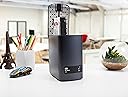
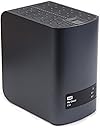
The WD My Cloud EX2 Diskless NAS is a versatile two-bay network storage solution designed for home and small office prosumers. Featuring a 1.2 GHz dual-core processor and 512MB RAM, it supports multiple RAID configurations and offers extensive backup options. With DLNA-certified media streaming, advanced app support, and seamless remote access via desktop and mobile apps, it empowers users to build a personalized, secure cloud storage system without monthly fees.
| Hard Drive | Diskless |
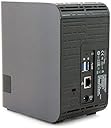
| Number of USB 3.0 Ports | 1 |
| Brand | WD |
| Item model number | WDBVKW0000NCH-NESN |
| Hardware Platform | Mac, PC |
| Item Weight | 1.8 pounds |
| Product Dimensions | 6.1 x 3.9 x 6.75 inches |
| Item Dimensions LxWxH | 6.1 x 3.9 x 6.75 inches |
| Color | Red |
| Hard Drive Interface | ISCSI |
| Manufacturer | WD |
| ASIN | B00I2P53NY |
| Is Discontinued By Manufacturer | No |
| Date First Available | March 4, 2014 |
M**T
AMAZING DRIVE, INCREDIBLY EASY SETUP, MANAGMENT AND ACCESSIBILITY, BUT SEEMINGLY SLOW FILE COPYING
I was in the market for a NAS for quite sometime and am really happy I went with the WD My Cloud Ex2. In my opinion, you cannot beat it for the price.Why I wanted a NAS - I have tons of high quality photographs and videos that were eating away at the internal HDD on my laptop. I also have an older laptop with about 250gb of photos, music, and videos and I wanted to keep everything in one place. Further, I wanted to have access to all my files from outside my home and also wanted an iTunes server. I consider myself an advanced tech person on the home networking level and wanted a central server for storing all of my files.Pros - The NAS is INCREDIBILY easy to setup and was working perfectly as soon as it was on my network. Literally, it took no time to setup other than plugging in the power and Ethernet cable. It showed up instantly on my network and I was able to start saving files immediately. Further, the web interface is amazing and extremely simple to use. The My Cloud app is even easier to use and found the drive instantly. Even better is the fact that without any network configuration I was able to leave my home and the My Cloud app worked perfectly. I was able to stream photos and videos to my iPhone and iPad outside effortlessly. I was also able to provide access codes for my parents and brother so they could access the drive from outside my network. Worked like a charm. You can also email individual files to people or provide them access to a single folder without giving them full access to the drive. Absolutely genius and innovative ideas from WD in my opinion. For those of you that have experience with port forwarding and remote access, the fact that My Cloud works seamlessly without having to configure any network settings is remarkable. When in my home, I was able to stream movies (HD home movies and motion pictures), photos, and music without any trouble at all. This includes streaming to my iPad, laptop, and DLNA devices. In addition, the Drive is very small, compact and makes no noise at all. On top of that it is stylish and very nice to look at. I hope that my point is getting across here. The DRIVE IS AWESOME from setup, to looks, to accessing it, to management.Cons - The one con, which several other reviews touch on, is that the read/write times could be better. When copying at a 3gb folder full of photos and videos, it averaged around 20mb per second. I cannot compare this with another drive, but I have read there are better speeds out there from numerous sources. This is legitimately the only con I can think of. That said, I am fairly certain that most of the NAS drives out there that have better speeds are diskless. By the time you buy two 3TB drives the WD (which comes with drives) actually is cheaper. So for the money, not sure you can beat it.Conclusion - I was seriously considering purchasing a NAS for a long time and almost went with a Synology on several occasions. I have not used a Synology NAS so I cannot compare it with the WD. However, I do not regret my decision one bit. I really enjoy the fact that the WD came with drives installed and that is one of the main reasons I purchased it. Aside from the seemingly average speed of copying files, there is absolutely no negatives with this drive. Any user regardless of tech experience can set this drive up and immediately enjoy the benefits it has to offer. I strongly recommend the WD My Cloud Ex2 if you are in the market for a 6TB NAS for a great price that comes with simple setup and fantastic cloud features.
L**C
My internal home network is pretty much state of the art in terms of speed
Five stars out of the box and one week of use. I've been a computer "geek" and an "early adopter" since the Radio Shack Model 1. Each year, I am in awe over the new technology available to the consumer at a reasonable price. I had tried several NAS-like devices over the year and speed and reliability always caused issues. My internal home network is pretty much state of the art in terms of speed, reliability etc. and that probably plays an important role in customer satisfaction with this product. I had done a great deal of research on consumer level NAS solutions before deciding on this product. Setup was a breeze, the speed, in-house and mobile are way more than just "acceptable." I have shares set up for remote family members and they agree. Keep in mind that the performance of this box will be limited to the weakest link in your technology.If it helps, I can tell you that I definitely have a full speed internal network (gigabit) with Xfinity Blast internet service. I use Apples Time Machine for my wireless router. I have about 14 devices connected to my network which are a mix of Windows and Mac computers, several Apple and Android tablet devices, phones and several multi-media devices (TV's, Apple TV, Roku stick, printers and a Denon Receiver).The desktop computer and mobile apps work flawlessly. I purchased the unit with the 2 x 2TB drives because I wanted the Raid 1 configuration which provides total file redundancy (in case one drive fails). If I understood it correctly, the larger drives do not support Raid 1. These drives are WD 's Red Drives which are made for continuous operation like a commercial enterprise would want.The web interface is really good for viewing all facets of the unit's operation and for tweaking the settings to your taste. Also, the unit shows up as a shared drive on my iMac and Windows machines which give drag and drop functionality. I really like the feature that lets you set the hours of operation of the unit. I have it set to power up at 8 AM and shutdown at midnight. This should save a little on the electric bill and lengthen the life of the drives. And that is the only question that remains regarding my five star rating. Longevity and reliability. We shall see.
A**R
Avaliação
Até agora não tenho reclamações
J**Y
Easy to setup and works well
Easy to setup and works well. I really like the feature of having two HDD bays, so I can setup RAID 1. It's a bit more expensive, but I believe it's invaluable for the time you save when you want to have multiple back up locations for your data.
J**K
it's not as easy as stated to get connected to your computer via ...
Works more or less as expected. it's not as easy as stated to get connected to your computer via the network, but does work. Just be aware that you might need to take a bit of extra time on the first access.
C**N
En una nube de 8 personas.
Lo usamos para una oficina de arquitectura con una conexión base de 10mb/s y aún así funciona muy práctico, y solo con un disco SATA. Recomiendo considerar esta My Cloud como una opción que considera crecimiento.
B**2
WON'T READ FROM USB CONNECTED HARD DRIVES
I was disappointed to find out that this drive was entirely unable to find my already-loaded external hard drive (also manufactured by WD) when it was plugged into either one of the USB inputs at the back. I tried numerous ways to fix this but could not, and in the process found many users online who had basically the same difficulty. It did set up easily, and hsa operated in my network fine (so far), but because I won't read USB inputs, I have been forced - going through it now over the last 3 days - to transfer my files onto the EX2.
Trustpilot
1 month ago
1 month ago