📸 Keep your sensor spotless, your shots flawless, and your gear pro-ready!
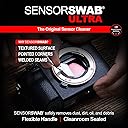
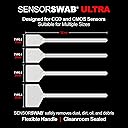
Photographic Solutions Sensor Swab Ultra 24mm Type-3 offers professional-grade sensor cleaning with a textured honeycomb pattern and ultra-soft, flexible heads that prevent damage. Cleanroom-sealed to eliminate fiber residue, these swabs are designed for full-frame mirrorless and DSLR cameras. Compatible with Eclipse and Aeroclipse cleaning fluids, this pack of 12 ensures your sensor stays dust- and oil-free, saving costly service trips and downtime.


| ASIN | B0029WUKVG |
| Best Sellers Rank | #75 in Camera & Photo Cleaning Kits |
| Customer Reviews | 4.5 4.5 out of 5 stars (386) |
| Date First Available | November 24, 2003 |
| Is Discontinued By Manufacturer | No |
| Item Weight | 1.44 ounces |
| Item model number | Sensor Swab Ultra |
| Manufacturer | Photographic Solutions |
Z**A
Pricey but Powerful: The Best Solution for Stubborn Sensor Spots
I rarely leave reviews, but I felt compelled to share my experience. First off, these swabs are definitely pricey—currently over $3 per swab, which seems steep. But here’s the thing: they work, and they work exceptionally well, especially when used with Aeroclipse. I had some very stubborn spots on my sensor that a blower and even a carbon sensor tool couldn’t budge. These swabs, however, handled them with ease. Yes, they are expensive, but considering the cost of sending a camera out for sensor cleaning and the downtime involved, it’s worth it. Regarding streaking, I did notice some, but the trick is to use more fluid—about 10 drops. If you do see streaks, they can be easily cleared with a LensPen SensorKlear. In short, while the price is high, these swabs offer a reliable, effective solution that saves both time and hassle for the working pro or avid amateur.
P**R
Dust Gone!
I noticed that my sensor had a lot of dust on it when I shot some images using f/22 - f/45 (long telephoto images). I spent a great amount of time on PhotoShop removing the dust images from my shots. It was actually quicker to clean the sensor than to edit the images. I was uncomfortable to clean the sensor but after doing some reading I learned that the sensor as a protective coating and if you read the instructions for these products it's OK to clean the CMOS chip. You must read the information and do everything suggested. If you put the swab down on a table it's "dirty" and cannot be used. You should not use any other cleaner than those recommended. You must clean the mirror box and outside of the camera before working with the sensor. If you have dust in the mirror box, it's just going to get into the camera... This swab is the right size for my Canon EOS 5D Mark II. It took a couple wipes to get all the dust off the sensor, but it left the CMOS chip perfectly clean, and solved my problem of dust on the sensor. It took a few tries to get everything. I just cleaned, made a couple exposures at f/45, checked them, re-cleaned, until it was done. There are some dumb examples of cleaning on the web - for example there's this one guy that is in a desert, opening his camera and cleaning it from the back of his truck... That did not impress me - I'd rather be in a closed environment with no dust floating around. Another guy used the swab to scour the sensor - he literally rubbed dozens of times - that did not seem like a good idea either... This swab must be used with some form of cleaner - I used Eclipse. This cleaner evaporates very fast and does a good job of cleaning.
S**S
Easy to use, better than Canon's own servicing
I've sent my camera bodies in to CPS (Canon Professional Services) for their "clean and check" service many times in the past. They do an OK job, but sometimes the cameras still come back with dust on the sensor. These seem overpriced for what they are, but so far I haven't found another option that beats it in terms of simplicity, effectiveness, efficiency (I can do it on the spot,) and doesn't require me to ship my camera somewhere. Follow the directions closely, and it's pretty simple. Don't fool yourself into thinking you can use the same one to clean a second camera, or make multiple passes on the same camera. More often than not, it just ends up smearing the junk it picked in previous passes.
S**M
Essential photo accessory
These are essential for any digital photographer. They are great when using alongside the cleaning fluid they also sell. Just remember to move the swab one way against the sensor, then back the other way using the other side. Two motions, that's it. Use only once. Do not reuse.
M**M
Did the job!
First time ever doing a wet cleaning on any DSLR for me...I was quite scared but watched a bunch of videos and read the directions. Be sure to also buy the AEROCLIPSE Digital Sensor Cleaning Fluid (NOT the lens cleaning fluid) for use on the camera sensor. Before/After shots attached, to see the dust set the slowest aperture your lens allows (mine was f/22), focus manually to the farthest distance, zoom to maximum, put the camera close up pointed at an even light source like an all-white page of a computer monitor. This gives you the most even lighting on the sensor (out of focus, avoiding any lens/lighting imperfections and hilighting sensor-imperfections). Then use photoshop to boost the contrast by about 70% and brightness by 10-20% and that should be a worst-case for dust spot identification. Couple things...get a nice medium-bright flashlight to see down into the camera well. Also consider using only 1 side of several swabs, and "wet" both sides with drops until they appear to be "damp" about half way up the swab head. I couldn't get rid of streaks doing a swipe each direction like the box says in my first two tries...but I ultimately decided to try 2 fresh swabs doing only 1 direction pass and that did result in a streak free sensor in the flashlight and got rid of my bad dust spots.
F**K
if it takes two swabs like it did me it is only slightly over six ...
At first glance these seem very expensive, however, if it takes two swabs like it did me it is only slightly over six bucks to clean the sensor. That is a far cry from what it costs to send a camera off and have it done. I suggest looking at the video on the Photographic Solutions web site for a good review on how to clean the sensor. It may take several attempts to get the procedure down but it is actually fairly easy to do. A note of caution, the swabs look clean after one use, however, I introduce particles onto the sensor after reusing one. And yes, the instructions say discard after use! The Photographic Solutions web site is also a good source for determining the Type 1,2,3 swab that you need for your camera. They have all brands of cameras listed.
D**A
I was somewhat nervous about cleaning the sensor on my Sony A7R. However I needn't have been. Using the Type 3 Sensor Swabs with a few drops of Eclipse Sensor Cleaning Fluid (both manufactured by Photosol.com) was really very easy and sorted out the problem in one go. The instructions on the box are easy to follow and there's a couple of useful videos on the manufacturers website which show how to undertake the task of cleaning as well as rather reassuringly guaranteeing the safety of the sensor when using the product. The only negative is the high price of both the swabs and the fluid But then again, it all works out much cheaper than sending the camera off to have it professionally cleaned. All in all an effective though rather expensive product.
E**A
Buenísimos, caros pero valen la pena. Tenía unos de otra marca de 16 mm y dejaban un espacio sin limpiar en el sensor de mi Fujifilm x-T50. Estos son un poquito más grandes (17 mm) y son perfectos en tamaño y calidad.
A**S
Expensive but does the job.
M**U
ce produit est idéal pour l'entretient courant de son capteur d'apn. C'est plutot cher, mais comparé au prix demandé en boutique pour un nettoyage de capteur ca vaut le coup
M**.
L'ho usato per pulire il mio sensore. Con un paio di questi e il liquido, con due di questi ho pulito il sensore perfettamente. Operazione da fare con attenzione, magari documentandosi su internet. Il tipo di sporco che ho eliminato in foto non si vedeva. Con i video RAW invece c'era un "pelo" visibilissimo oltre che qualche macchiolina che sono spariti dopo la pulizia. Prima di fare il passaggio ho anche usato una pompetta ad aria e una spazzolina per il sensore di quelle finissime che passate vicinissime quasi senza toccare il sensore attraggono la polvere. In internet ci sono molti modi e spiegazioni-
Trustpilot
1 month ago
2 months ago