


Desertcart purchases this item on your behalf and handles shipping, customs, and support to Iceland.
📼 Turn nostalgia into digital gold—capture, edit, and share your story!
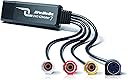
The AVerMedia EZMaker 7 is a compact USB 2.0 video capture card designed to convert analog VHS and other media formats into digital files. Compatible with Windows 7 through 11 and Mac OS 10.11/10.12, it supports RCA Composite and S-Video inputs. Bundled with CyberLink editing software, it enables easy video editing and DVD authoring, making it perfect for preserving and sharing your vintage video collection.


| ASIN | B00603S1OS |
| AV Output | AVI, MPEG-2 |
| Antenna Location | Image Capture, Video Recording |
| Best Sellers Rank | #137 in Internal TV Tuner & Video Capture Cards |
| Brand | AVerMedia |
| Built-In Media | C039 AVerMedia DVD EZMaker 7, Quick Guide, USB Cable |
| Compatible Devices | Personal Computer |
| Customer Reviews | 3.6 out of 5 stars 700 Reviews |
| Global Trade Identification Number | 00795522963765, 00999996709502, 04710710674595 |
| Hardware Interface | USB |
| Item Dimensions | 3.2 x 1.1 x 3.2 inches |
| Item Part Number | 61C0390000AK |
| Item Weight | 1.7 ounces |
| Manufacturer | AVERMEDIA |
| Mfr Part Number | C039 |
| Minimum System Requirements | Compatible with Windows and Mac OS |
| Model Name | C039 |
| Model Number | C039 |
| Number of Items | 1 |
| Number of Packs | 1 |
| Operating System | Windows 10 |
| Platform | Windows 10, Windows 11 |
| Recommended Uses For Product | Image Capture, Video Recording |
| Tuner Type | PAL, NTSC |
| UPC | 999996709502 795571057613 795522963765 898029645018 809385666548 795522964045 809186271651 807030496052 163120601264 100177338422 803982783868 172304347812 012300176798 132018346129 763615932004 |
| Video Capture Resolution | 480p |
| Warranty Description | 1 year |
D**R
Simple, fast, easy, GOOD!
I am about to go and write a BAD review for a similar item, (EasyCAP DC60) which I bought prior to ordering the AVerMedia C039. If this review spares one person from making the similar mistake, I'll be glad. Like lots of folks out there, I have old personal videos on VHS, VHS-C, and 8mm tape, and I'd like to convert them to digital to share and store. The cost of having that done is a bit off-putting, and you just have to leave off your old tapes (or mail them) with someone and hope they do a good job of it. Having captured video in the past from magnetic media via (now antiquated) capture cards, I took a peek online and found that since then, the hardware has come a long way! Now you can also EASILY capture the sound along with the video (used to be more to that), and it's all in a convenient USB device that's all external. I thought I could save a lot of $ by trying to convert my own videos, with less than a $20 investment, and I assumed I could lick the technical gotchas confronting reviewers frustrated by the (much cheaper) EasyCAP device. That is too big a subject to delve into here, but suffice it to say despite not being a noob I couldn't get very far with it. I was a tad hesitant to try another similar device fearing I'd get burned twice, but after taking a look at AVerMedia's professional lineup of products and support at their website I went for it. SO HAPPY! What a total difference in quality. I am using it for now on my notebook, which has no DVD drive, so I had to go the route of downloading the drivers from their website. I installed them, plugged in the device, and immediately started capturing video through the built-in cam, then live via the cables from the old Sony HandyCam, and then finally from one of the old tapes, just like that. As I do not have a DVD drive for this PC I can't comment on the included software (going to install that later) so I am using a free version of AMCAP from the web, and it works fine so far for what I need to do, except that I have to convert the files later to get their size down. There is a bit of a learning curve left as to efficiently capturing and compressing the video but I believe I will be able to accomplish my goal of converting my own videos at a tiny fraction of the cost of paying someone else to do it, and it should be kind of fun. Using the AMCap program, the onscreen display sometimes looks a bit choppy and laggy, but when I play back the recorded video file it's fine, so that is likely due to my little notebook's graphics capabilities and is not reflected in the quality of the recordings. It might turn out that I need a meatier PC to do the actual work but that is in no way the fault of the capture device. I am on Windows 7 starter, on a little ASUS notebook, and this device works just fine for what I need it to do. I would not hesitate to recommend it based on my experience thus far.
B**N
Rarely works, weak picture quality, but the hardware can be forced to work correctly if you're good with computers.
If the tool works, it can work. But I had to fight it for a full day. I tested it on four Windows computers (two Windows 7 and two Windows 8.1). Out of four computers, it only worked on one. One displayed the video garbled up. Two wouldn't display any video at all. The CD didn't have drivers for Windows 8.1, I had to download them off the internet. The instructions didn't match the steps for installation, I had to be a bit clever during the process. No instruction was given for the provided software. Once I was able to poke around and find the correct tool, it did start encoding the VCR tape video/audio. I had a long video tape, a couple of hours long, and it kept splitting it into 4 GB chunks (I presume so those chunks could each be written to DVD.) Further, the video quality wasn't good. Old fashioned TV did something called interlacing, where they faked 60 frames a second. Frame 1 would display only even pixel lines, frame 2 would display odd pixel lines, frame 3 back to even pixel lines, frame 4 back to odd pixel lines, etc. The software tool would combine even lines from frame 1 and odd lines into frame 2 to make a new frame, and leave the picture at 30 frames per second. That meant lots of jagged lines and "combing" effects, and movement isn't as fluid anymore. Even when there was little movement, the edges of shapes were still jaggedy. And the output format was restricted to an old fashioned MPEG format, not great for modern devices. I suppose if you wanted to only burn a 20 minute segment from VCR to DVD only and you didn't care about picture quality, this tool works. But if you want to convert a huge VCR collection and keep the VCR quality, the package fails miserably. I eventually did get what I wanted. A free tool called virtualdub allowed me to "filter chain" with the exact de-interlacing process I wanted (so it generated good 60 frames per second NOT interlaced). I was able to take that output, and feed it into another free tool called Handbrake, which converted the raw format into proper h264 for video and mp3 for audio. The end result was a compact file, a clean picture, and the output format is very interoperable with so many other tools (such as DVD Flick and imgBurn to burn my DVDs). In short, if you know your way around computers, this hardware gives you the options you need. But you need to find the right software tools and manage them yourself. And you have to get lucky hoping the driver will work with your computer. If I had to do this all over again, I'd do more research and spend money on a nice higher quality device with better success rates and better software. Normally I'd give 1 star, but I did manage to salvage this thing, so I bumped it up to 2 stars. Edit: Picked it back up again a few months later. It stopped working entirely. The thing appears broken.
E**R
I like the product but it is not "Plug and Play" for everyone
The software installed pretty easy. I have a Win 7 home premium, 64 bit, Pentium dual 3.2 GHZ with 4GB RAM. I validated that the right version of DirectX was on my PC and it was but I ran the install from the AverMedia CD anyways. I then. loaded the Cyberlink Media Suite 10 CD. I needed the CD key which is printed on the CD so I had to start over. Write down your serial number on the CD sleeve before you start to optimize time. This is where the fun starts. I opened up PowerDirector from the start menu and it recognized the AverMedia DVD EZmaker 7 RCA/USB connector device. I clicked on the Capture icon on top and it enabled two icons - "Capture from TV signal" and "Capture from External or Optical" device. It defaulted to "Capture from TV signal". I turned on my Sony DCR-TRV230 Camcorder, clicked Record in the capture player controls and no video was presenting in the Capture preview window. I recorded for a while and then stopped since I was testing out if the settings were right and to see the record quality. I stopped the recording and it requested a file name. I provided it and reviewed the video. Nothing recorded. I shut down the app and rebooted my PC since this magically resolves issues. Went through the steps again and same results. I switched to "Capture from External or Optical" icon and that didn't work either. Then I figured I'd review the product reviews on Amazon for any pointers. No luck. I then went to the Cyberlink site and found the PowerDirector User Manual. When all else fails read the manual. I realized that this is a sophisticated piece of software that needs some User Understanding. Scanned the manualto pick up pointers. Went back into PowerDirector and started playing with Profile and Capture settings. No luck and I didn't find Cyberlink knowledge base helpful for my questions. I got tired and went to bed. I woke the next morning and went at it again. All of a sudden it is magically working with no changes and another reboot. My goal was just to copy my hundreds of hours of 8mm tape to DVD or a hard drive. I have ripped through 5 tapes already and am very happy since it is working and the content is amazing. I'm going to see if I can leverage some of the editing capability with the PowerDirector software to clean up the content. Not sure what this version provides but I will read the manual and Play. The Avermedia web site and Quick Guide are not very user friendly. They have the Mac User Guide linked to the non Mac version which I have. The User Interface is different. I didn't contact Customer Support because it was the weekend.To Sum it up I am happy with the product but the documentation can be improved. To be able to digitize all of the kids and family functions from the past is amazing. It also is going to save me hundreds of dollars. Sorry for being so verbose but if this saves someone some time and frustration it is worth it.
A**1
No problems for converting VHS to digital
I have used this usb dongle via a composite video connection to my VHS player to convert dozens of family videos; paired with the free software, Avermedia Power Director on my desktop computer (AMD Ryzen with 16 GB Ram). I capture direct to AVI 640x480 (yes it's gargantuan sized like 100 gig/hr), and then compress to MPEG-2 at a variable data rate around 18000, with noise reduction and softening to 640x480, and it produces excellent results on the big screen that look better than the vhs player connected right to the big screen (each video is about 2.5gig/hr). If you use a lower data rate, you will likely get artifacts of anything moving. I recommend capturing a 15 second AVI and then playing around with a bunch of different compression settings to see what works for you. Dont have any other applications running in the background, including virus scanners! Video capture can be tedious to get it right, but is worth it when converting a bunch of VHS when they're like $20/ea if you send them out. I also used the Avermedia audio plugin to fix a few of the tapes that had annoying buzzing (noise reduction option) and it worked great.
B**.
Must know what you are doing
The included software loaded slowly, but works OK. A little slow, but I guess that's to impel one to buy the upgraded software. To hook up to a VCR, you'll need a patch cord between the VCR and included cords. The cords in the box are female, and so are the jacks on the VCR, so you'll need three male patch cords (two audio, one video). I am a novice when it comes to converting VHS to DVD, so it would be nice if the free software came with a help file. I have had zero luck after two attempts of actually writing a DVD that can be read by my DVD player. The final step of writing to the DVD never completes, even after waiting 7 hours to write a 16-minute long video. Pros: easy (but slow) installation of software; low cost Cons: need patch cords; no help file in software; very slow writing of DVD. December 10 update: I was finally able to make a straight copy from VHS to DVD fairly reliably. I copied about 15 hours of video, and the program failed only once. A "straight copy" means no editing of the file to add graphics or title cards. I never was able to make the editor work. Oh, well, at least my precious videos are now on DVD. FYI: I was able to copy one of hour of VHS recording onto one DVD.
T**R
Still works in Windows 11, but you need to use custom resolution in OBS. Support is AWESOME!
I've used my Avermedia DVD 7 capture device extensively with windows 7, but when I tried again with windows 10, I ran into issues. Blue screen in OBS. No display in VLC either. I got the card working with OBS on Windows 11, but this will likely work for windows 10 also. First, download the driver from the AverMedia website. Thank you AverMedia Tech Support for this info! They helped me 11 years after my purchase! To use with OBS, configure the following settings for the video capture device: Device: AverMedia USB Polaris Analog Capture Resolution/FPS Type > Custom Resolution:720x480 FPS: Match Output FPS Enable "Use custom audio device": Analog Audio In (AverMedia C039 USB Capture Card)
A**R
OK, If you can get it to work
Aver EZmaker 7 was delivered this morning. After 6 hours of fooling around I finally was able to transfer one of my home movies to a file that I can read on my Windows 10 PC. The following are the issues I have had: 1. There is very limited documentation that comes with this item, so you had better have a really good understanding of how your PC functions. If you are lucky the software will install properly. That was not the case for me. 2. Aver EZmaker 7 driver installs. This did not work the first time, so I uninstalled everything and tried again, twice. I finally got it to work by installing the drives in safe mode. Not sure why it didn't install properly, but probably due to some driver conflicts somewhere. I've had issues before with Windows 10 automatic updates so I hope the driver conflicts don't come back with the next update. 3. The item comes with a "suite" of software from Cyberlink called Media Suite 10. To call it a suite is a bit of a joke. There is no documentation included. I searched and found some online but it doesn't match the software as there are many functions that are disabled. I also noted that Suite 10 is 6 years old (created in 2012). The current version seems to be 16, I think. 4. After fooling around with the software a bit I finally figured out how to "capture" a vhs tape and create a file on my PC. The problem is, the file type is .MPG which doesn't play on any software I have except what is included in the "Suite". There appears to be no option to save as a .mp4 or other file type. So, I had to use another program to convert it. There appears to be a Media Suite conversion program but it is not included in the "suite" that is delivered with this item. 5. The "Suite" comes with a lot of functions disabled, including the conversion utility. I supposed you could buy the current "suite" at $64, but then there would be no guarantee that it would work with this device. 6. Also, every time I open the program I get annoying popup advertisements to purchase upgrades and / or more software. I'll keep the device as I hope I can process all my VHS tapes before something goes wrong. However, this is not a easy way to go about it. I really don't need any of the fancy editing tools that seem to be included. Overall, this is a very poor product, so barely 2 stars. Update: After the first time I used this device and software, on the next use if failed again. The software refused to recognized the Aver card. After spending several more hours of reinstalling and testing I have finally figured out how to get this device to work on my Windows 10 computer. Your results might vary, but I'll list the steps here. 1. When finished, make sure you eject the Aver card properly by using the windows eject procedure. Don't just pull it out. 2. I had trouble with the cyberlink software recognizing the Aver card unless I followed these startup steps: a. Power down you PC b. Plug the Aver card in the PC and power back on. Make sure the device you are capturing from is powered off !!!! c. Once your PC is powered up, start the cyberlink director software c. Only when the software is started and it has recognized the device then power up the capture device. Crazy that this POS is so bad, but that has worked for me. Hope this helps someone else. Also, lowering my ranking to one star !
J**O
Great Product - might need extra cord
This worked great. Keep in mind that you might need an extra cable to actually attach to a VCR. I believe other reviews had more technical explanation of it, but my husband had several on hand so it wasn't an issue to me. However, if we didn't have that cable that would be annoying as another thing I would have to buy. Other than that, this worked great. I installed the software on a windows 8 OS and it was fine. The software also comes with video editing! So fun!! I put 4 hours of home dance videos onto a DVD. Then I gave them out as gifts to my friends where were in the dances. We had so much fun watching them and they really appreciated the thought. Great product, easy to use. Shipping was accurate. Oh and if it wasn't obvious I went from a VCR to computer. It sounds like you can also hook this up to a camcorder, but I haven't tried that.
S**N
ürün
bu ürünü daha öncede kullandım memnundum fakat bozulmuştu yeniden aldım
M**N
Muy buena para streamings.
La compré con la duda de poder o no utilizarla en streamings, ya que investigué y existen dos versiones de la misma tarjeta, y una solo captura para grabación, afortunadamente la que se vende aquí es la que también sirve para transmisiones en vivo, OBS la aceptó sin problemas. Otro asunto importante es que NO ES NECESARIO usar el S-Video, punto a favor. El precio es un tanto elevado para algo de calidad SD, pero el material se siente durable, la calidad es la máxima que se le puede sacar a la definción estándar, además incluye un cable extensor para que la tarjeta no quede colgada en las laptop. Su empaque también me pareció muy cómodo y bonito.
H**N
big challenge for drivers!!
The drivers came with products all are out of version. I couldn't use it with MAC OS, but finally after lot of challenges it works with windows 10.
R**I
funcionou bem
placa funciona de acordo com o esperado, software q acopanha é bom para o uso de captura e conversão para mp4
E**C
Buena calidad de imagen, de las mejores capturadoras en su gama.
Había probado varias capturadoras y ésta es la que más calidad de video saca, ningún problema en su configuración tampoco, enchufar y listo.
Trustpilot
3 weeks ago
3 weeks ago