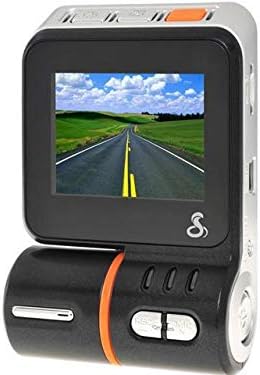
Cobra Electronics CDR 810 Drive HD Dash Cam
Product ID: 1155497
🌙Infrared Night Vision
🎤Selectable Audio
📹1080P HD Recording
Desertcart purchases this item on your behalf and handles shipping, customs, and support to Iceland.
🚗 Drive with Confidence: Your Road Companion Awaits!
The Cobra Electronics CDR 810 Drive HD Dash Cam is a high-performance dash camera that records in stunning 1080P Full HD. It features user-selectable audio recording, infrared night vision, and comes with an 8GB MicroSD card for immediate use. With continuous loop recording and a built-in G-Sensor for collision detection, this dash cam ensures that every moment on the road is captured and protected.
D**.
CDR 810
I got the CDR 810 model. Reviews seem to be for all 4 models here mixed so maybe mine will help somebody.I will just list what I immediately noticed, other features are just - you know - being assumed taken for granted.Anyway:- that is true that some trees are not green, they are purple. However other greens are green. It for some reason is not upsetting at all. My first though was "they did this on purpose to fight the sun/glass glare" - and there is no glare by the way...- very wide angle. Makes a tiny fish-eye effect. Also not upsetting at all. Videos good enough to even do a mix-tape from the road trip.- you can set "rotate - on" and then the cam will assume that mounted upside down (i.e. dash board) and video will record correctly then (preview while driving will be upside down though)- Comes with car charger (long cord) and actual USB cable. USB when connected asks you what you want to do "PC CAM / USB STORAGE / CHARGE ONLY). Never tried PC CAM. Was not even aware it's an option.- Memory card provided / even inserted.- File sizes rather large. 3 min AVI on medium setting (720p) is ~400MB
R**R
Decent, but with its caveats.
As others have pointed out, the manual isn't that clear. Couple things to remember: *hold* the photo/playback button to enter/exit playback mode. Don't tap it, as it'll enter photo-mode - then it gets annoying as it takes pictures every time you tap the center button. Holding photo/playback exits the review mode.Also - if you do happen to switch to photo mode (tapping instead of holding) - you need to hit the record button to switch to video.That said, video quality looks good so far. You can also mute the recording, which is great. Oh, it's *mini* USB, not micro (de facto standard for most phones these days); bit annoying.**UPDATE**Thought I'd include better instructions below (forgive the formatting):View videos and photos (Playback Mode):> Press & Hold [Top-Center] button to enter Playback Mode> Cycle through videos / photos using up/down arrow buttons> Press [Orange] button for video playback> To delete a file: - Press [Top-Left] to enter menu - Using up/down arrow buttons, highlight "Delete" - Press [Orange] button to select "Delete" - Follow on-screen instructions, using up/down arrow buttons to highlight desired choice and [Orange] button to select choice> To Exit, Press & Hold [Top-Center] buttonVideo Mode> "Video camera" icon in upper left corner indicates device is currently in Video Mode - If you see a "Photo camera" icon in the upper left, you are currently in Picture Mode - Tap [Record button] to enter Video Mode (Record button doubles as up arrow)> While in Video Mode, press [Record button] to begin and stop recording - Pressing the [Orange] button also begins recording, but records a protected file - To stop recording while recording a protected file, press the [Record button]> Press [MIC] to turn on/off the microphone, as needed> While in Video Mode, you can set turn on/off "Cyclic Record" or cyclical recording - While in Video Mode, press the [Top-Left] button - Use up/down arrows and [Orange] button to select "Cyclic Record" and select length of segment - To protect a video clip from being over-written, press the [Orange] button while recording> To view videos, see Playback ModePicture Mode> "Photo camera" icon in upper left corner indicates device is currently in Picture Mode> If you see a "Video camera" icon in the upper left, you are currently in Video Mode - Tap [Top-Center] to enter Picture Mode> While in Picture Mode, press [Top-Center] to take photos> To view pictures, see Playback ModeSettings> Basic settings are under the "Wrench" icon and are accessed by tapping the [Top-Left] button twice, in either Video or Picture modes - Use up/down arrow buttons to highlight desired choice and [Orange] button to select choice> Mode-specific settings must be accessed while in that particular mode - Video-specific settings only available while in Video Mode - Picture-specific settings only available while in Picture Mode - Use up/down arrow buttons to highlight desired choice and [Orange] button to select choice> Press [Top-Left] button to exit menus
T**8
Dont waste your money
This unit does not have the GPS feature. The next model up, has the GPS feature. User manual is not descriptive of all features. Takes some playing with to get comfortable with the navigation of menu's and options. Video quality decent***UPDATE*** August 2016I forgot that I had ever even given this dashcam a review. Well several months after purchase it got glitchy and wouldn't keep settings. Not to mention, upon review of videos to watch an accident I witnessed, the camera blacked out for the whole segment. Unless they've made changes, but something else.
D**.
very cool device
We used this on a recent road trip. We pushed the orange button every time it was recording something we knew we wanted to keep, otherwise it would keep recording 3-minute segments until the 32Gig card was full (four hours worth) and then would record over the oldest ones. By marking with the orange button, the device saves those files as SOS... filenames and will not record over them. Handy feature. Very high quality HD video! (keep your windshield clean in front of the barrel) !!
D**X
Disappointed with Cobra on this one
I bought this camera about a year ago. It seemed like it worked well enough at first. But then the suction cup mount broke where it attaches to the camera. So I got out the glue and glued it back together then it broke where the mount attaches to the suction cup I glued it again. Mean while it goes through a micro sd card once a month. In all fairness I should mention that I leave the unit on all the time in a commercial truck in case somebody backs into it when its parked. So it is loop recording all the time. It is frustrating buying a memory card once a month and continually gluing the cheap Chinese mount back together every couple of months.I just watched a youtube video about reformatting your card using the camera format option once a week how that will give you more use out of your card so once my new memory cards arrive so I can put the camera back in action I will try doing that to see if I can get more write/read cycles out of it.
L**C
Nice and compact
We purchased two of these and have had them for about 1 1/2 months. I've had no problems so far with this unit and is fairly easy to use. Some reviewers have complained about the owners manual being vague, but like with most products these days a more detailed user manual can be located on their website. If you go to Cobra Electronics website, you can find a more detailed user manual. I would definitely recommend this over the other cheap junk out there that ships straight from China. At least here you have a bigger name manufacturer for support and quality.
T**N
The instructions that came with it are very poor!!
The unit appears to work well. The instructions that came with it are very poor!!! I had to go to the net to get something that could be understood and worked with. I am still puzzled by the segments and how and why they cut off. When I understand that, I may get something out of the playback on the computer.As far as video goes, it appears to be good.
D**E
Works very well, but the instructions are too brief ...
Works very well, but the instructions are too brief and do not thoroughly explain the features very well at all.
Trustpilot
3 weeks ago
3 days ago