Desertcart purchases this item on your behalf and handles shipping, customs, and support to Iceland.
🚀 Elevate your workspace—extend, connect, and conquer in 4K clarity!
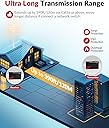
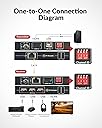
The AV Access 4KIP100-KVM is a professional-grade KVM extender that transmits 4K@30Hz video and USB 2.0 signals up to 120 meters over a single Cat5e/6/7 Ethernet cable. Supporting 1080p at 120Hz refresh rate and up to 16 simultaneous networked sets via DIP switches, it ensures ultra-low latency and broad compatibility across Windows, Mac, Linux, and gaming consoles. Designed for high-performance environments, it features robust ESD protection and a 1-year warranty, making it ideal for professionals demanding flawless remote desktop and multimedia extension.


| ASIN | B07MQR5B88 |
| Actuator Type | Push Button |
| Best Sellers Rank | 49,958 in Computers & Accessories ( See Top 100 in Computers & Accessories ) 140 in KVM Switches |
| Brand | v AV Access |
| Circuit Type | 1-way |
| Colour | Black |
| Compatible Devices | PC, PS, Xbox, Windows, Mac, Linux |
| Connectivity Protocol | TCP/IP Ethernet |
| Connector Type | RJ-45 |
| Connector type | RJ-45 |
| Contact Material | Copper |
| Contact Type | Normally Closed |
| Contact type | Normally Closed |
| Control Method | Remote |
| Control Type | remote |
| Controller Type | Push Button |
| Country Of Origin | China |
| Customer Reviews | 3.9 out of 5 stars 129 Reviews |
| Item Dimensions | 11.2 x 1.8 x 6.5 centimetres |
| Manufacturer | AV ACCESS |
| Manufacturer Part Number | 4KIP100-KVM |
| Material | Metal |
| Model Number | 4KIP100-KVM |
| Mounting Type | Rack Mount |
| Number of Items | 1 |
| Number of Positions | 16 |
| Operating Voltage | 12 Volts |
| Operating voltage | 12 Volts |
| Operation Mode | Manual |
| Operation mode | Manual |
| Specification Met | CE, FCC |
| Switch Type | Toggle |
| Switch type | Toggle |
| Terminal | physical |
| UPC | 634923852912 |
| Unit Count | 1.0 count |
T**Z
Exactly the solution I was looking for
I was looking for a way that I could have the same display from my PC HDMI go to my main monitor in my game room to the TV in my bedroom! I have this device hooked up to a HDMI splitter and then a CAT 6 cable running through the loft space into the bedroom wall and out behind the TV. I have a wireless mouse and keyboard and have the keyboard 2.4Ghz receiver plugged into the receiving end of this device since I use a wired keyboard at my desk and the wireless mouse is plugged into my pc and has very good range. The value for money is impeccable! The quality is excellent and it’s very easy to install, although to get it looking tidy and neat (for instance having the cable run through the ceiling into the loft and through the wall) it can get tricky if you have never done anything like that before! It’s the perfect solution though and works flawlessly! I am getting high fps (around 200 @1080p) which is plenty for me when I’m on a tv anyway and basically zero latency which is perfect for playing WoW in bed.
D**K
Somehow works, but it wouldn't work with more than 1 switches with Nvidia card.
It works perfectly when you ONLY have 1 switch in between your PC and the TV. Nvidia card only works this way. If you happen to have more than one switch like PC <> KVM <> Network Switch A <> Network Switch B <> KVM <> TV , it wouldn't work. However, PS5/Nintendo Switch 2 seems to work having 2 network switches in betwen. Just PC with Nvidia card doesn't work. AMD onboard video card somehow works with 2 network switches, but restricted to 1080P and not 4K, and you HAVE to manually change the resolution on your PC for the AMD card.
L**P
Works very well, clear, latency free image!
Bought this after having issues with a different HDMI USB Ethernet KVM, so far it's been working very well. The image is clean and the response time seems great, can't even tell the difference to having my PC directly connected. I use it with a racing simulator setup, which I have connected to my computer outputting 1080p/120hz. I did have to disable HDMI Deep Colour on my TV to get an image, after contacting support they told me it's because their unit doesn't support 4K/60hz only 30hz, which is stated in this description. I use 2 of the USB's for my steering wheel and pedals with a powered USB hub in the 3rd port, which I connect a wireless Keyboard and a USB wireless headset. I haven't experienced any issues after hours of use. My only issue with the device is that after using it and turning off the receiver end my PC still stays connected to the HDMI output so I have to unplug the HDMI to my graphics card for it to go back to the Display port which my monitor uses. Not a big deal though.
A**.
it doesn't work on network over multiple switch
when connecting the devices over one single switch works fine but doesn't work over a network with multiple switch.
A**S
No lag kvm, works brilliantly
I needed a kvm to control a remote pc that runs our home automation. I decided to run a dedicated network cable between the tx and rx units. The result is amazing. There is zero lag from my key presses to what appears on my monitor, mouse control is equally lagless. It worked straight out of the box, no configuration needed. I would recommend running a network cable between the two units rather than using your lan for the best result.
N**O
Brilliant - Zero latency and works on a switch with solid reliability.
I work at an audio post production facility and needed a solution to run some high res displays with no compromise on sync. These boxes have been perfect. I've currently got about 4 pairs running in different rooms some at 2560x1440 and others at 1080p. All have been extremely reliable with no issues at all. No drop offs, no sync issues. USB is solid as well. I'd highly recommend these despite there being slightly cheaper products. These are perfect.
C**Y
Easy to use plug and play
This is a very well made extender as you would expect from the price tag (£162), which I think it is a decent price but still an expensive piece of kit. The extender comes with a transmitter and a receiver, if you are doing a single extension then all you need to do is to plug in the HDMI cable and the USB cable from your computer to the transmitter, connect the transmitter and the receiver using a fast ethernet cable (CAT5 or above), then you got your USB ports on the receiver where you can plug your keyboard, mouse or whatever you want to control your computer. Both the transmitter and the receiver come with individual power adaptor that has 3pin UK plug or Europe plug converters. This extender allows me to take one ethernet cable up to my bedroom TV and I have full control of my PC downstairs on my TV. As if I was having a PC next to me but using a different my TV as monitor which is very handy to watch movies and even do a bit of gaming on the bed. In terms of performance, I have not noticed any latency. At 4K quality this can only run 30fps which is not so smooth but most games or videos I watch online do not need the full frame rate so it is enough for me. I don't have a HDMI splitter, therefore each time I go back to my PC downstairs I will need to unplug the HDMI cable and plug it back into the monitor downstairs, which is a bit of a pain. It could do with a HDMI out in the transmitter too so that I dont have to source my own splitter. Overall, this is a very simple solution to 'remotely' control your computer. It has a dip switch so it can form part of the one-to-many or many-to-many connections. The size of this is a lot smaller than the earlier generations KVM extender. It is not cheap but definitely very useful if it suits your need.
T**N
Colour banding occurs
Worked with 4k 60hz and HDR from Apple TV and oppo Blu Ray to my projector over cat 6. However, marked colour banding occurred even at lower but rate signals. Eg. 4k 24hz 4.2.2 hdr from the Apple TV. Ended up going back to my old balans which would run at 10Gbs and not this 18Gbs. I can’t do 4k 60hz hdr but at least I don’t have the banding now. I guess there is some compression occurring in the signal to get all the information down a cat 6 cable.
G**K
Funciona perfecto
Funciona muy bien pero si piensas en conectar 4k mejor ve a por uno que sea 60hz que es un poco más de dinero
S**M
Verzögerungsfrei und 4K
Ich habe das Produkt bisher mit einem 15m CAT 5e Kabel getestet. Die Übertragung vom 4k60Hz YUV422 war ohne Probleme erfolgreich! Das Produkt hält was es verspricht! Der Empfänger sollte nicht an einem engen Ort untergebracht werden, er wird merklich wärmer als der Sender.
W**S
Goed product, doet wat het hoort
Goed product, werkt naar behoren. Relatief lelijk 'Waiting for signal' scherm wanneer de computer net is uitgezet, gaat weg na enkele seconden. Werkt goed
S**E
This really works and passes 4K@60
I hooked this up last year December of 2020 and this has worked flawlessly for over a year. I am using CAT 6a and the run is very long as it goes from the front of my room up through the wall, into the ceiling, across the room and then back over to the center of the room where my EPSON HC5050UB is. If I look at the input details on a HDR movie from my player it shows 60K. I am simply blown away that this works and recommend it to anyone who does not want to run a HDMI or where it is easier to fish a CAT cable through the walls etc. Maybe once or twice I had to unplug the box at my receiver and plug it back in to get the signal to work - but that was maybe when I didn't use my theater room in a couple of weeks / month(s). I have no issues passing any content - Firestick, XBox, Bluray, 3D, 4K --- I have never received any errors. Hope this helps other owners out there looking for a great alternative to solve long run cable issues, or don't want to have to swap HDMIs every time something changes
A**W
Fonctionne parfaitement, avec quelques limitations
Dans mon cas, je l'utilise pour relier mon PC à ma télé (LG OLED C2), en utilisant un des port USB pour un clavier sans fil bluetooth. Je n'utilise pas de routeur entre les 2 boitiers. J'ai une bonne image en 4k et la limitation des 30Hz n'est pas percéptible pour les vidéeos sur youtube et autre service de streaming. Je n'ai pas testé le mode 1080p@120Hz en jeu. J'ai rencontré les problème suivant : _ Le signal ne passait pas (LED Signal qui clignotte) lorsque des boitier CPL étaient utilisés, sûrement à cause de la bande passante trop faible (même les modèle avec 2000Mbps de débit théorique). _ La connexion USB était instable (déconnexion intempestive) lorsque le boitier émetteur était relié à un port USB3. Le problème a été résolut en le branchant sur un port USB2. Le support du constructeur "AV Access" est très réactif, via leur ChatBot sur leur site internet. J'ai eu un conseillé réel en moins d'une minute, et pour les questions plus poussées, il fait appel à un technicien. Le seul inconvénient, c'est que le support se fait en anglais.
Trustpilot
2 weeks ago
2 weeks ago